

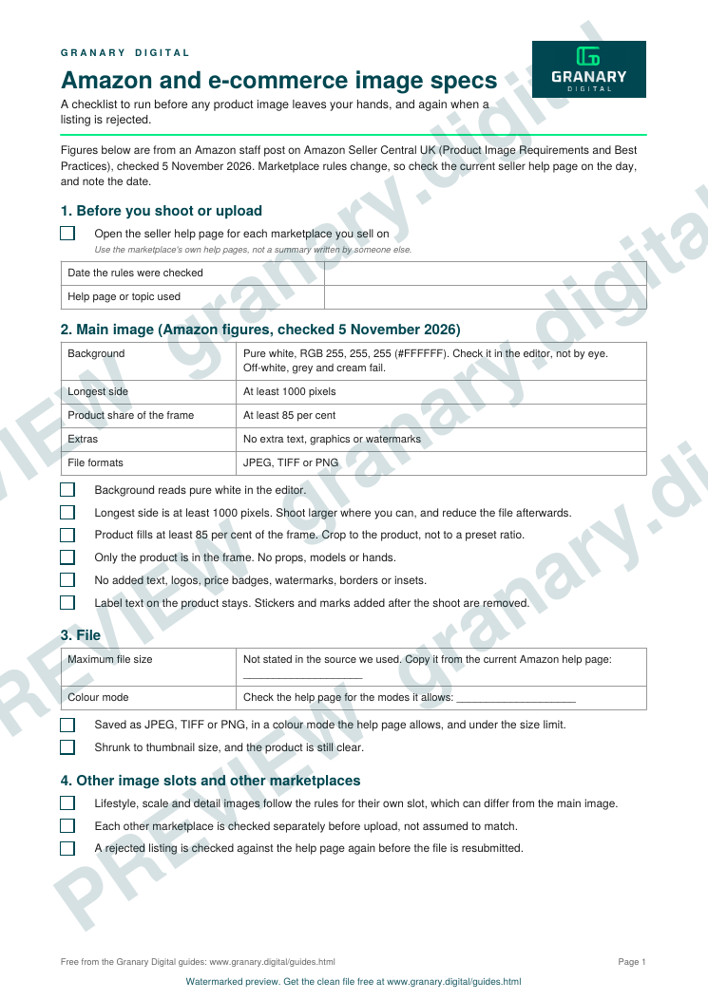
In short: For an Amazon main image, use a pure white background (RGB 255, 255, 255, hex #FFFFFF), make the longest side at least 1000 pixels, and fill at least 85 per cent of the frame with the product. Use only the product, with no extra text, graphics or watermarks. Save as JPEG, TIFF or PNG. Check the current seller rules before each shoot, because marketplace policies change.
An Amazon main image must show only the product, on a pure white background, at least 1000 pixels on its longest side, with the product filling at least 85 per cent of the frame.
What the checklist is for
The checklist is for the person who shoots, edits or uploads product images. Use it before any file leaves your hands, and again when a listing is rejected. It covers the main image, which is the one that shows in search results, and it notes where the other image slots differ.
Get the checklist
The preview is free to look at and print. For the clean file, without the watermark, put your email in and we will send a download link straight away. You also join From the Barn, our monthly studio email, which you can leave whenever you like.
Open the watermarked preview (PDF)
Done. The download link is on its way to your inbox and works for 7 days. If it has not arrived in a few minutes, check your spam folder.
How to use the checklist, step by step
- Set the background. Use an even white background and check its value against #FFFFFF in your editor. Off-white, grey and cream all fail.
- Frame the product. Let the product fill at least 85 per cent of the frame. Crop to the product, not to a preset ratio.
- Check the size. The longest side must be 1000 pixels or more. Shoot larger if you can, and reduce the file afterwards.
- Strip the extras. Remove any added text, graphics, price badge, banner or watermark.
- Show only the product. Props and hands belong in the other image slots, and some categories have their own rules on models.
- Save it properly. Use JPEG, TIFF or PNG. Check Amazon's seller help pages for the colour mode and the file size limit before you upload. The checklist sheet leaves both as blanks to fill in from the current help page.
- Look at it small. Shrink the image to thumbnail size and check that the product is still clear.
A worked example
A glass bottle is shot on an infinity cove with two strip lights and a white card to lift the shadows. The first frame has the bottle at about 60 per cent of the height, so the frame is too loose. The photographer moves the camera closer and crops to the bottle until it fills about 85 per cent of the frame. The background looks grey on the screen, so the exposure is raised until the background reads pure white. The file is saved at 2000 pixels on the longest side and reduced to 1200 pixels for a final check. The label text is part of the product, so it stays. The sticker that says "New" is removed in the edit.
The example is general. Light and exposure need testing on the actual product and the actual set.
Common mistakes
- Off-white backgrounds. A grey or cream background looks white on a laptop but fails the check.
- Too much empty space. A small product in a large frame is rejected even when the background is right.
- Text on the image. Promotional text, badges and "Best Seller" banners are not allowed on the main image.
- Small files. An image under 1000 pixels on its longest side will not zoom, and Amazon gives 1000 pixels as the minimum.
- Relying on old rules. Marketplace rules change. Check the seller help pages before each batch.
Where a studio helps
A white cove is the usual set-up for a main image, because it gives an even background without a seam. The product photography on an infinity cove page explains the set-up, and packshot versus lifestyle explains which images a listing needs in addition to the main one. If you want a studio day for a product run, the studio hire page covers the rooms and the terms.
Sources
- Amazon Seller Central UK seller forums (Amazon staff post), Product Image Requirements and Best Practices, read 5 November 2026
Related guides
- Product photography on an infinity cove
- Packshot vs lifestyle: which images you need
- Food photography in a studio: styling, light, hero shots
- Commercial, corporate and advertising photography explained
- All guides and tools
The picture at the top of this page is an illustration, not a photograph of a client or a real job.
Questions we get asked
What size should an Amazon product image be?
The longest side should be at least 1000 pixels, which Amazon gives as the minimum for zoom. Many photographers shoot larger and then reduce, so the file keeps its detail when zoomed.
Can an Amazon main image have a shadow or a reflection?
Amazon's main image guidance calls for a pure white background and an image of the actual product. Rules on shadows and reflections vary by category, so check Amazon's current image standards for yours before you shoot, and keep a version with no shadow or reflection as a safe option.
Do e-commerce images need to be the same on every marketplace?
No. Each marketplace has its own rules for the main image and the extra slots, so treat Amazon's rules as one set and check each other site before you upload.
granary.digital · 01243 884993 · studio@granary.digital · The Old Grainstore, Adsdean, Chichester, West Sussex, PO18 9DN · Prices exclude VAT unless marked inc VAT