

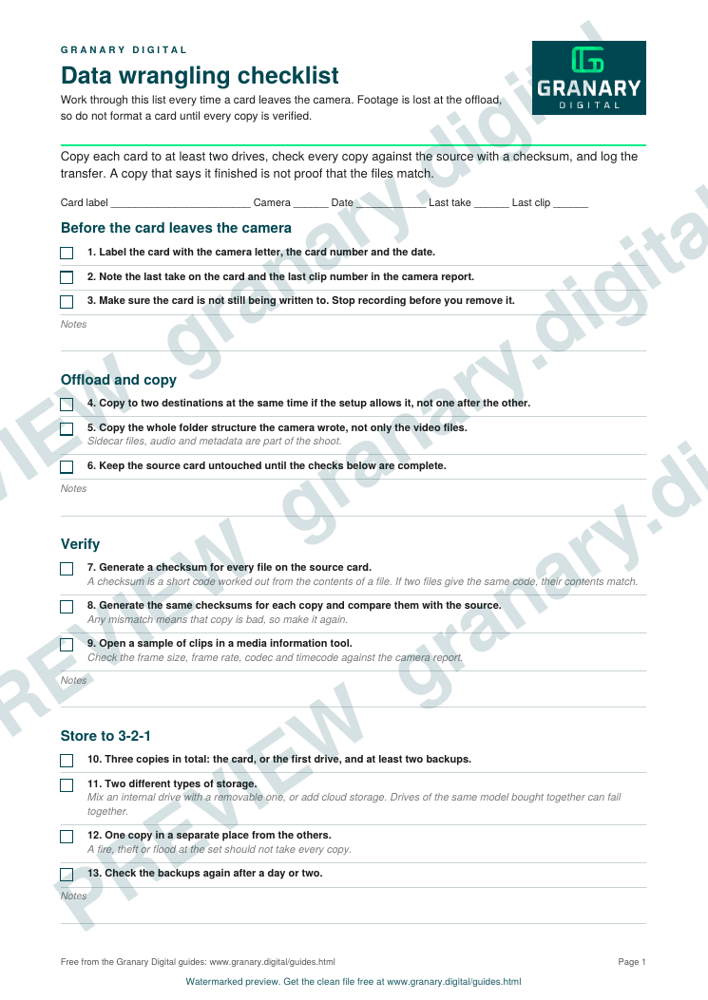
In short: Copy each card to at least two drives, verify every copy against the source with a checksum, check the files play with the right frame rate and timecode, and log the transfer. Keep three copies of every file on two types of storage, with one copy in another place. Format a card only after the verified copies exist. A copy that says it finished is not proof that the files match.
What the checklist is for
It is the list a data wrangler or the camera assistant works through at the end of each setup, before the card goes back in the bag. It covers the offload, the check, the backup and the log. The offload log is the record that shows which card went where, and it is what the post team trusts when the picture is missing a shot.
Get the checklist
The preview is free to look at and print. For the clean file, without the watermark, put your email in and we will send a download link straight away. You also join From the Barn, our monthly studio email, which you can leave whenever you like.
Open the watermarked preview (PDF)
Done. The download link is on its way to your inbox and works for 7 days. If it has not arrived in a few minutes, check your spam folder.
Before the card leaves the camera
- Label the card with the camera letter, the card number and the date.
- Note the last take on the card and the last clip number in the camera report.
- Make sure the card is not still being written to. Stop recording before you remove it.
Offload and copy
- Copy to two destinations at the same time if the setup allows it, not one after the other.
- Copy the whole folder structure the camera wrote, not only the video files. Sidecar files, audio and metadata are part of the shoot.
- Keep the source card untouched until the checks below are complete.
Verify
- Generate a checksum for every file on the source card. A checksum is a short code worked out from the contents of a file. If two files produce the same code, their contents match.
- Generate the same checksums for each copy and compare them with the source. Any mismatch means that copy is bad, so make it again.
- Open a sample of clips in a media information tool and check the frame size, frame rate, codec and timecode against the camera report.
Store to 3-2-1
- Three copies in total: the card, or the first drive, and at least two backups.
- Two different types of storage. Mix an internal drive with a removable one, or add cloud storage. Drives of the same model bought together can fail together.
- One copy in a separate place from the others, so a fire, theft or flood at the set does not take every copy.
- Check the backups again after a day or two. A backup that has never been checked may not restore when you need it.
Only after step 8 is complete should the card be formatted.
Common mistakes
- Trusting the "copy complete" message and formatting the card straight away.
- Copying only to a laptop, which is then the only copy of the day's work.
- Formatting a card that was copied to one drive, with the second copy still to be made.
- Naming files the same way on every card, so the offload log cannot tell two cameras apart.
- Buying three drives of the same model and calling it a backup.
Where it fits
Storage numbers for the shoot come from the data rate and storage calculator. The settings that produce the files come from frame rates and the 180 degree shutter. The general guidance here applies to most shoots, and the data lead on the production sets the actual procedure, including how often the backups are checked and where the offsite copy is kept.
Sources
- Production Expert, Back up basics: the 3-2-1 backup rule, read 5 November 2026
Related guides
Questions we get asked
What does 3-2-1 mean for film footage?
Three copies of every file, on two different types of storage, with one copy kept in a different place from the others.
Is a checksum needed if the copy reported success?
Yes. A progress bar shows the transfer ran, not that the files match. A checksum compares each copy with the source and catches a corrupted file.
granary.digital · 01243 884993 · studio@granary.digital · The Old Grainstore, Adsdean, Chichester, West Sussex, PO18 9DN · Prices exclude VAT unless marked inc VAT