

In short: A run sheet is one timed list of every cue in a live event, from doors to wrap. Each row gives the time, the action, one named owner, the source it uses and a backup. Fill it from the real start time rather than the plan, give every cue one owner, and print copies for the stage manager, the vision mixer and whoever runs the stream.
A run sheet is the one document everyone on a live event works from. It turns the plan into timed cues and tells each person what they do, when they do it and what happens if it goes wrong. Build it in a spreadsheet, fill it in from the real start time and keep one master copy that everyone updates.
What the run sheet is for
Live events tend to fail in the gaps between people. A speaker walks on before the lights are up, or the stream shows an old slide because the change was made in the room and not on the feed. A run sheet closes those gaps by putting every cue in one order and naming who owns it.
Get the template
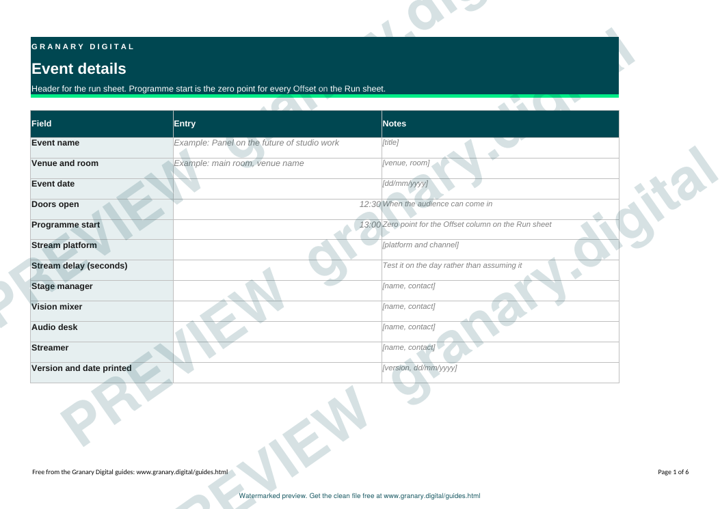
The preview is free to look at and print. For the clean file, without the watermark, put your email in and we will send a download link straight away. You also join From the Barn, our monthly studio email, which you can leave whenever you like.
Open the watermarked preview (PDF)
Done. The download link is on its way to your inbox and works for 7 days. If it has not arrived in a few minutes, check your spam folder.
Columns and how to fill them
- Time. The planned clock time for the cue. The template has an Actual time column beside it, which you fill in on the day. Offset (minutes from programme start) and Planned end work themselves out from the planned time, the programme start on the Event details tab and the Duration you enter.
- Cue. A short action in plain words, such as "Speaker one to stage", "Lower third on" or "Cut to wide".
- Owner. One name. Two names for one cue means nobody owns it.
- Source. The camera, slide deck, audio feed or video file the cue uses.
- Audio and graphics. Microphone on or off, the music file, the lower third title or the caption.
- Backup. What happens if the source fails: the second camera, a still image or a holding slide.
- Stream. Yes or No: whether the online audience must see the cue.
- Status. Blank, in progress or done.
Step by step
- List the blocks of the event first, such as doors, each talk, breaks and close.
- Break each block into cues. Every time the picture changes or someone moves, that is a cue.
- Give each cue an owner. If the owner is a speaker, check they can do it without help.
- Attach a source and a backup to each cue. Ask the person running each feed what they will do if it drops.
- Time the sheet from the real start. Confirm with the venue when doors open and when the programme can actually begin, and build the times from those.
- Mark the cues the online audience must see at the same moment as the room, and tell the streamer about the delay.
- Run a rehearsal against the sheet and change anything nobody could do in the time given.
- Print the sheet for the stage manager, the vision mixer, the audio desk and the streamer. Give each speaker a page with only their cues.
A worked example
A 90-minute panel with three speakers starts at 13:00, with doors at 12:30 and a live stream on the event platform.
| Time | Cue | Owner | Source | Backup |
|---|---|---|---|---|
| 12:30 | Holding slide up, house music | Stage manager | Slide 1 | Looped title card |
| 12:55 | Microphones checked, panel seated | Audio desk | Panel microphones 1 to 3 | Spare wireless on the table |
| 13:00 | Opening title, lower third | Vision mixer | Title file | Still of the title card |
| 13:02 | Host introduces the panel | Host | Wide camera | Close camera |
| 13:05 | Question one to speaker A | Host | Close camera on speaker A | Second close camera |
| 13:50 | Break slide, music bed | Stage manager | Slide 12, music file | Holding slide |
| 14:05 | Questions open, online questions read out | Host and streamer | Online question feed | Written list from the producer |
Common mistakes
- Planned times, not real times. A sheet built from the plan is wrong by the first break. Update the actual time column and move the rest.
- Two owners for one cue. Each assumes the other has it.
- No backup. A camera feed fails and the only plan is to stop.
- Forgetting the stream. The room hears a cue before the online audience does, and questions read out late look like a mistake.
- A sheet nobody prints. A file on a laptop does not help the person on the desk when the lights drop.
If you want the cues run on the day by people who do this regularly, event AV production covers vision mixing and streaming for events. Our note on live streaming an event lists the faults that turn up most often.
Related guides
- Vision mixing basics: ATEM and vMix
- Streaming bitrate and bandwidth calculator
- Latency and sync test file: how to use it
- NDI, SDI or HDMI: which to use and when
- Free software for live production: OBS, Companion, CasparCG
- All guides and tools
The picture at the top of this page is an illustration, not a photograph of a client or a real job.
Questions we get asked
What should a live event run sheet include?
Each cue needs a time, a short description, one named owner, the camera, slide or audio source it uses, any audio and graphics notes, and a backup. Add a status column so people can tick cues off as they happen.
Who uses a run sheet at a live event?
The stage manager calls the cues, the vision mixer and the streamer follow them, and the speakers and venue team need the timings for their part. Keep one master copy and print only the pages each person needs.
How do you time a run sheet for a live stream?
Build the sheet from the real start time, then allow for the stream delay on any cue the online audience must see at the same moment as the room. Test the delay on the day rather than assuming it.
granary.digital · 01243 884993 · studio@granary.digital · The Old Grainstore, Adsdean, Chichester, West Sussex, PO18 9DN · Prices exclude VAT unless marked inc VAT