

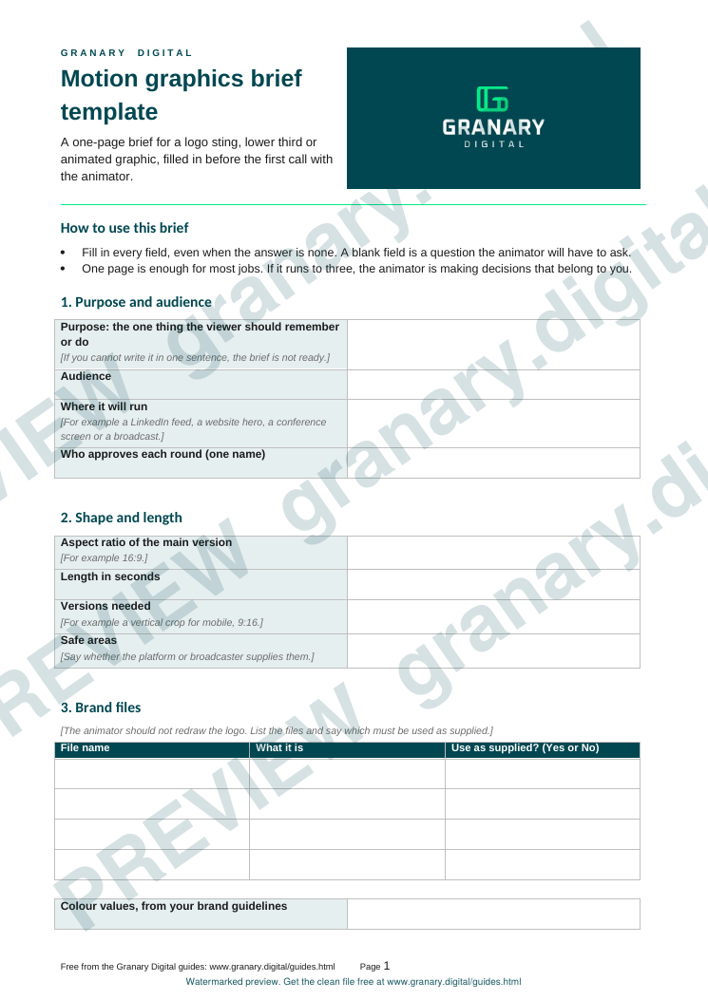
In short: A motion graphics brief sets out the purpose, the audience, the platform, the length, the brand files, the copy, the sound and the approval steps for an animated graphic. Fill it in before the first call with the animator. A brief that names one approver and supplies every logo and colour file usually saves a review round.
What the template is for
A motion graphics brief tells the animator what the graphic has to do, where it will be seen and who decides when it is finished. The person who writes it is usually the marketing lead or the producer. The person who reads it is the animator, who uses it to plan the work and to decide what to ask before starting.
Use the brief for logo stings, lower thirds, title cards, animated charts and short brand graphics. Fill in every field, even when the answer is "none". A blank field is a question the animator will have to ask.
Get the template
The preview is free to look at and print. For the clean file, without the watermark, put your email in and we will send a download link straight away. You also join From the Barn, our monthly studio email, which you can leave whenever you like.
Open the watermarked preview (PDF)
Done. The download link is on its way to your inbox and works for 7 days. If it has not arrived in a few minutes, check your spam folder.
How to fill it in
- Purpose. Write the one thing the viewer should remember or do after the graphic. If you cannot write it in one sentence, the brief is not ready.
- Audience and platform. Name where the graphic will run: a LinkedIn feed, a website hero, a conference screen or a television broadcast. Each platform has its own shape and safe area.
- Shape and length. State the aspect ratio and the running time in seconds, and the number of versions you need, such as a vertical crop for social.
- Brand files. List the logo files, the colour values and the fonts you are supplying, with their file names. Say whether the animator should use the logo as supplied. The animator should not redraw it.
- Copy. Give the exact words, numbers, spellings and punctuation, and the time each line should appear. Mark any line that may change.
- Sound. State whether the graphic has music, a voiceover or nothing. Say who supplies the audio and whether it is licensed.
- Deliverables. List the file formats, the frame size, the frame rate and any alpha or transparent versions you need.
- Approvals. Name one person who approves each round, and the date for each round.
A worked example
This is a made-up example for a made-up firm, Greyfield Tax. The purpose is for viewers to remember the firm name and visit its website. The platform is LinkedIn, in landscape and in a vertical crop for mobile. The length is 12 seconds for the wide version and 8 seconds for the vertical crop. The brand files are the logo as an SVG and a PNG with a transparent background, a navy and a warm grey colour value, and the company's sans-serif font. The copy is "Greyfield Tax" on the first frame and "Book a free call" on the last. The audio is the existing brand music, licensed for social. The approver is the marketing manager, with two review rounds, the first by the end of the week.
Common mistakes
- Writing the brief as a wish list with no single purpose, so every round asks for a different thing.
- Leaving out the logo files, so the animator guesses at a shape or a colour.
- Changing the copy at review without a version number, so nobody knows which words are approved.
- Not stating the aspect ratio, so the graphic is cut off on the feed it was made for.
- Asking a committee to review, with no named person to say yes.
For help choosing between a drawn animation and filmed footage, read animation or live action: a chooser. If the graphic belongs to a shoot, send this brief with the shoot brief, and the Content Studio day page explains how a produced day is planned.
Related guides
The picture at the top of this page is an illustration, not a photograph of a client or a real job.
Questions we get asked
What should a motion graphics brief include?
The purpose, the audience and the platform, the aspect ratio and length, the brand files and colours, the exact copy, the sound, the file formats, and the name of the person who approves each round.
How long should a motion graphics brief be?
One page is enough for most jobs. If it runs to three, the animator is being asked to make decisions that belong to you.
granary.digital · 01243 884993 · studio@granary.digital · The Old Grainstore, Adsdean, Chichester, West Sussex, PO18 9DN · Prices exclude VAT unless marked inc VAT