

In short: A sound report logs every take the recordist captures: the roll, the scene and take, the timecode in and out, the microphones used and a short note on the take. Fill it in after each take, while the slate and timecode are fresh. Mark the takes the director wants, and flag any take with a fault such as rustle, a dropout or a plane overhead.
What the report is for
The editor and the post sound team work from the report, not from memory. It tells them which take to use, where to find it on the recorder and what went wrong with it. A complete report on the day saves hours in the edit and stops a faulty take reaching the cut.
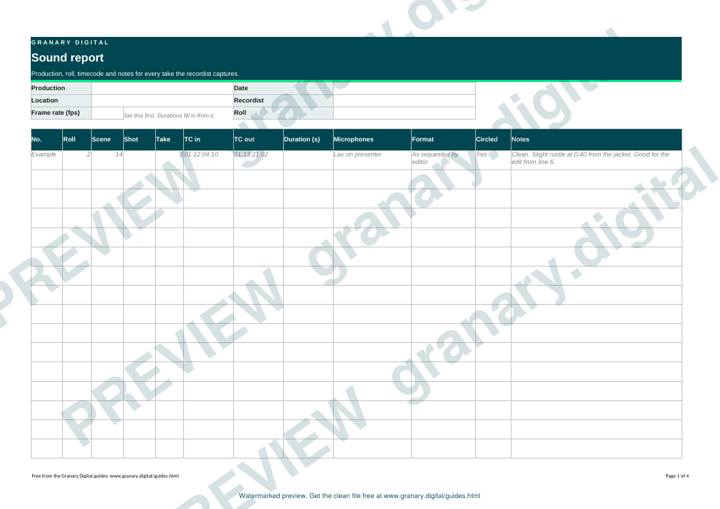
Get the template
The preview is free to look at and print. For the clean file, without the watermark, put your email in and we will send a download link straight away. You also join From the Barn, our monthly studio email, which you can leave whenever you like.
Open the watermarked preview (PDF)
Done. The download link is on its way to your inbox and works for 7 days. If it has not arrived in a few minutes, check your spam folder.
Fields to fill in
| Field | What to write |
|---|---|
| Production | The title, and the episode or reel number |
| Date and location | The day and the room or site |
| Recordist | Your name |
| Roll | The card, folder or recorder roll number |
| Scene and shot | From the slate or the shot list |
| Take | The take number, including any pickups |
| Timecode in and out | The start and end of the take on the recorder |
| Duration | The length of the take |
| Microphones | Which microphones were used, such as a lav on the presenter |
| Format | Sample rate and bit depth. Match what the editor asks for. Granary delivers ADR files at 48 kHz and 24-bit |
| Circled | Whether the director has marked the take |
| Notes | Plain words on what was good and what was wrong |
A worked example
Roll 2, scene 14, take 3. Timecode 01:12:04:10 in and 01:13:21:02 out, lav on the presenter, circled by the director. Notes: "Clean. Slight rustle at 0:40 from the jacket. Good for the edit from line 6."
The note says what was good and where the fault sits, so the editor can decide without playing the whole take.
How to fill it in on the day
- Before the first take, write the header: production, date, location, your name and the roll number.
- After each take, note the slate, the timecode in and out and the microphones. Do it before the next setup.
- Record the takes the director circles, and any take with a fault.
- Write notes in plain words. Say "clean", "room noise at 0:40" or "pickup needed for line 3".
- Save the report at the end of each day and send it to the editor with the files.
Common mistakes
- Filling it in at the end of the day from memory. Take numbers and times are wrong by lunchtime.
- Slate numbers that do not match the camera report.
- Leaving out the roll number, so the takes cannot be found on the card.
- Writing "good" in the notes. Say what was good and what was wrong.
- Leaving out the timecode. Editors search by timecode, not by title.
Related reading
The location sound starter covers the kit and the room tone that goes on the report. The timecode and sync explained page shows how the timecode in the report lines up sound and picture.
Related guides
- Location sound starter: boom, lav, room tone
- Lav placement: where to clip a lavalier microphone
- Timecode and sync explained, with an LTC test file
- Audio test pack: tones, pink noise and sweeps
- How does remote ADR work?
- All guides and tools
The picture at the top of this page is an illustration, not a photograph of a client or a real job.
Questions we get asked
What goes on a sound report?
The production, date and location, the roll, scene and take, the timecode in and out, the microphones used and a short note on each take, including any faults.
Who uses a sound report?
The editor uses it to find takes, the director uses it to choose them, and the post sound team uses it to match sync and clean up the audio.
Should the sound report be filled in during the shoot?
Yes. Write it after each take, while the timecode and take number are fresh. A report written at the end of the day is usually wrong in small details.
granary.digital · 01243 884993 · studio@granary.digital · The Old Grainstore, Adsdean, Chichester, West Sussex, PO18 9DN · Prices exclude VAT unless marked inc VAT