

In short: Pack a grab bag with the cables and adapters, spare batteries, a clicker, a pen and printed notes, and a memory stick with your slides. Send your slides ahead, keep a copy in cloud storage, and bring your own laptop even if the room has one. Check the bag the night before and again before you leave. Most failures on the day are small items, not the big kit.
Most of what goes wrong on a presenting day is small. A cable is missing, a battery has died, or the laptop will not talk to the screen. A bag you pack the same way every time takes those problems off the list, so you are not trying to remember them on the morning.
The advice below follows the Present Yourself series on preparation, which treats the bag as part of the talk rather than an afterthought.
Why a fixed bag works
Keep one bag for presenting and never take things out of it without putting them back. The list stays the same from one event to the next, so a missing item stands out at once. Print the checklist and tape it inside the lid.
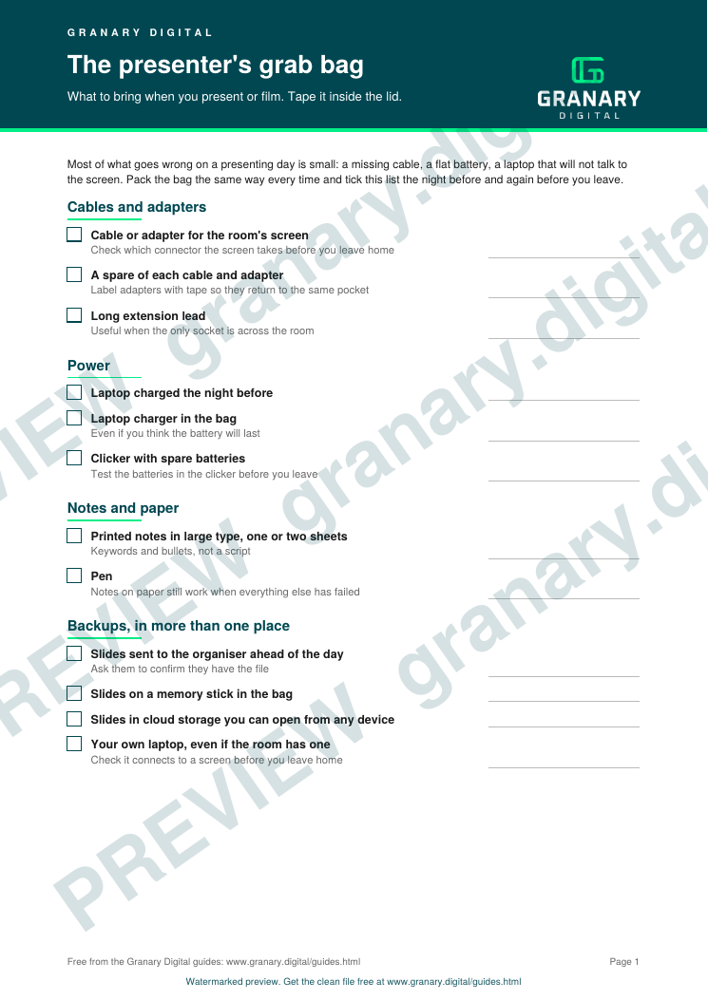
Get the checklist
The preview is free to look at and print. For the clean file, without the watermark, put your email in and we will send a download link straight away. You also join From the Barn, our monthly studio email, which you can leave whenever you like.
Open the watermarked preview (PDF)
Done. The download link is on its way to your inbox and works for 7 days. If it has not arrived in a few minutes, check your spam folder.
Cables and adapters
Bring the cable or adapter your laptop needs for the room's screen, plus a spare of each. Check which connector the screen takes before you leave home, not in the room. Label the adapters with a strip of tape so they go back in the same pocket every time. A long extension lead is useful when the only socket is across the room.
Power
Charge the laptop the night before and pack its charger. Carry spare batteries for the clicker and test them in the clicker before you leave. A laptop with a flat battery is no backup, so keep the charger in the bag even if you think the battery will last.
Notes and paper
Print your notes in large type on one or two sheets. Keywords and bullets work better than a script, because a script tempts you to read, and reading sounds like reading. Take a pen too. Notes on paper still work when everything else has failed.
Backups
Keep the backups in more than one place:
- Send your slides to the organiser ahead of the day, and ask them to confirm they have the file.
- Keep a copy on a memory stick in the bag.
- Keep a copy in cloud storage you can open from any device.
- Bring your own laptop, even if the room has one, with the cables to match.
A worked example
Say you are giving a forty-minute talk at a conference two hours from home. The night before, you charge the laptop and put the charger, two adapters, a spare clicker battery, a printed copy of your notes and a memory stick in the bag. That evening you email the slides to the organiser and get a reply confirming they have them. On the morning, you check the bag against the list. On arrival, the room's laptop will not show your slides. You plug in your own, use the adapter from the bag, and start on time.
Common mistakes
- Relying on the room's laptop without checking it first.
- Sending the slides on the morning of the talk, or not sending them at all.
- Packing kit you have not tested, such as a clicker with unknown batteries.
- Assuming the adapter that fits your laptop also fits the screen.
If the day is a studio shoot rather than a conference, the room does more of the work. A studio hire includes house lighting, grip, a dressing room and fibre internet, so your bag can hold just you and your notes. The first studio day guide shows how the day runs hour by hour, and what to wear on camera covers the clothes side.
Related guides
- Your first studio day: what to expect, hour by hour
- What to wear on camera for a video shoot
- All guides and tools
The picture at the top of this page is an illustration, not a photograph of a client or a real job.
Questions we get asked
What should a presenter bring to a presentation?
Your slides on a memory stick and in the cloud, your own laptop with its charger, the cables and adapters the room might need, a clicker with spare batteries, and printed notes. Send the slides to the organiser ahead of the day as well.
Should I bring my own laptop to a presentation?
Yes, where you can. A laptop you know works with your slides and fonts is less risky than one you meet ten minutes before you start. Check that it connects to a screen before you leave home.
What is a backup plan for a presentation?
Slides sent ahead to the organiser, a copy in cloud storage, a memory stick in your pocket and printed notes. If the technology fails, you can still speak from the notes.
granary.digital · 01243 884993 · studio@granary.digital · The Old Grainstore, Adsdean, Chichester, West Sussex, PO18 9DN · Prices exclude VAT unless marked inc VAT