

In short: Agree the number of rounds and the deadline in the brief. Collect every note in one form per round, each with a timecode, a type (must fix, suggestion or new request) and a named owner. Send new requests to a quote, not into the edit. Get written approval on each version before the next round starts.
Most approval trouble comes from three things: notes arriving in the wrong place, no agreed limit on rounds, and changes that are really new work in disguise. A single feedback form, filled in once per round, handles all three. The template is a fill-in form, so the same layout works for a 30-second cutdown and a 10-minute film.
Agree the rules before the first cut
Write these into the brief or the quote, not into an email chain:
- How many rounds are included, and what counts as a round.
- Who makes the final decision, by name.
- The date each round's notes are due back.
- What a new request costs, and how long it takes to quote.
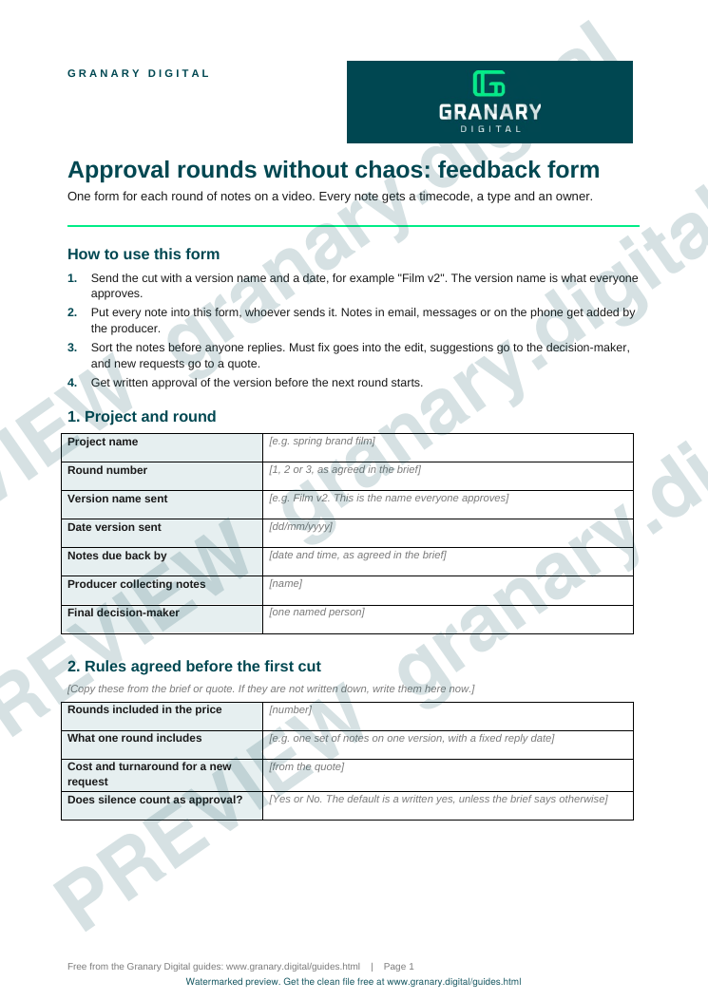
Get the template
The preview is free to look at and print. For the clean file, without the watermark, put your email in and we will send a download link straight away. You also join From the Barn, our monthly studio email, which you can leave whenever you like.
Open the watermarked preview (PDF)
Done. The download link is on its way to your inbox and works for 7 days. If it has not arrived in a few minutes, check your spam folder.
How to run a round
- Send the cut with a version name and a date, for example "Film v2". The version name is what everyone approves.
- Ask for all notes in the one form. Notes in email, messages or a phone call get added to the form by the producer, or they are missed.
- Each note gets a timecode, the change asked for, and one of three types: must fix, suggestion or new request.
- Sort the form before anyone replies. Must-fix notes go into the edit. The decision-maker decides the suggestions. New requests go to a quote.
- Send the revised cut with the note numbers it answers, so each note can be ticked off.
- Get written approval of the version before the next round starts.
A worked example
A fictional sports nutrition brand has a 60-second film in its first round, with fourteen notes from three people. Sorting the form gives six must-fix notes: a product name spelled wrongly, a logo held on screen for too short a time, and two lines of spoken copy that changed after the shoot. It also gives five suggestions and three new requests, for a second product, a new location and an extra cutdown. The editor makes the six fixes. The decision-maker accepts three of the suggestions and declines two. The three new requests go to a quote, and round two covers only the agreed changes.
Common mistakes
- Notes spread across email, messages and a phone call, so one of them is always missed.
- Treating silence as approval. Ask for a written yes, unless the brief says in advance that silence counts.
- Calling a new request a small change. If it needs new footage or more edit time, it is new work.
- Versions with no names, so nobody knows which cut they approved.
- Too many people with the power to say no. One named decision-maker, and everyone else advises.
Where the rounds fit
The feedback rules work best when they are agreed before the shoot, because the deliverables list sets out how many versions each output needs. The deliverables spec sheet template is the companion to this form. For the brief that sits before both, how to brief a video shoot sets out what to write down.
If you are commissioning a production from Granary, the Content Studio page explains the done-for-you day options. Whichever you choose, put the round count and the new-request route into the quote before the shoot.
Related guides
The picture at the top of this page is an illustration, not a photograph of a client or a real job.
Questions we get asked
How many rounds of feedback should a video include?
Agree a number in the brief or quote before the first cut, and say what a round includes. The number matters less than having it written down before anyone watches the film.
How do I stop too many people giving video feedback?
Name one decision-maker, and let everyone else send notes through the same form. Sort the notes by type before anything goes to the editor.
What counts as a change and what counts as new work?
A change fixes something in the agreed cut. New work needs new footage, new edit time or a new deliverable. Send new work to a quote before anyone makes it.
granary.digital · 01243 884993 · studio@granary.digital · The Old Grainstore, Adsdean, Chichester, West Sussex, PO18 9DN · Prices exclude VAT unless marked inc VAT