

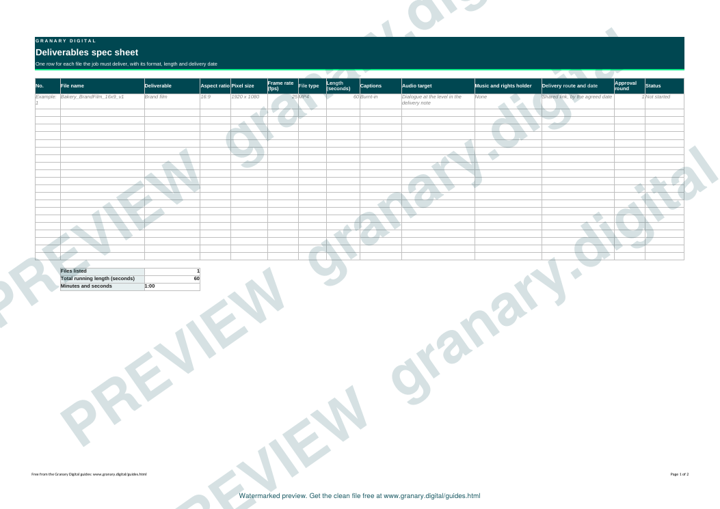
In short: List every file the job must deliver, one row each. For each, give the aspect ratio, pixel size, frame rate, file type, length, captions, audio target, file name and delivery date. Agree the list with the client before the shoot, because a vertical cut or a caption file added afterwards costs edit time.
A deliverables list is the cheapest insurance on a video job. It answers three questions: what exactly are we handing over, in what form, and by when. Write one row per file, not one row per video, so a single film that needs a horizontal cut, a vertical cut and a square cut shows up as three rows.
Why one row per file
A film is rarely one file. Each platform, each cutdown and each still is a separate output with its own size, length and caption needs. A row for each one means nothing is forgotten in the last week, when the client asks for the vertical version and the editor has already closed the project.
Get the template
The preview is free to look at and print. For the clean file, without the watermark, put your email in and we will send a download link straight away. You also join From the Barn, our monthly studio email, which you can leave whenever you like.
Open the watermarked preview (PDF)
Done. The download link is on its way to your inbox and works for 7 days. If it has not arrived in a few minutes, check your spam folder.
The columns
- Name. Use a pattern the whole team can follow, such as project, deliverable, aspect ratio, version and date.
- Aspect ratio and pixel size. 16:9 at 1920 by 1080 is the usual horizontal HD size. 9:16 at 1080 by 1920 is the vertical version, and 1:1 at 1080 by 1080 is square.
- Frame rate. Set it once for the project and state it on the sheet. 25 frames per second is common for UK projects. Mixing frame rates in one edit leads to problems that are hard to see until playback.
- File type and codec. Agree the container, usually MP4 or MOV, and the codec with the client or platform before the edit starts.
- Length. The exact length, plus any cutdowns, such as a 15-second and a 6-second version.
- Captions. Burnt-in or as a separate file. Say which, and who checks the spelling.
- Audio. The level target from the delivery note, whether there is music, and whether stems are needed. For music, name each track and say who holds the rights for each use listed.
- Delivery. How the files reach the client, by when, and to whom.
- Approval. The round in which each version is approved.
A worked example
A fictional bakery chain shoots a 60-second brand film in one day. The deliverables list has four rows.
- Brand film: 16:9, 1920 by 1080, 25 frames per second, MP4, 60 seconds, burnt-in captions, dialogue at the level in the delivery note. Name: Bakery_BrandFilm_16x9_v1.
- Vertical cutdown: 9:16, 1080 by 1920, 25 frames per second, MP4, 15 seconds, burnt-in captions. Name: Bakery_Cut15_9x16_v1.
- Square cutdown: 1:1, 1080 by 1080, 25 frames per second, MP4, 6 seconds, music and a title card, no speech, so no captions. Name: Bakery_Cut6_1x1_v1.
- Stills: JPG at full resolution, named by shot, delivered in one folder. Name: Bakery_Stills_Set_v1.
Common mistakes
- Writing "HD" without the pixel size, aspect ratio or frame rate. HD means different things to different people.
- Forgetting the vertical version until the client asks for it in the third week.
- Leaving captions off the sheet, then finding the platform wants a file.
- One row for the film and none for the cutdowns, so the cutdowns are made from memory.
- No naming pattern, so the final folder holds files called "final" and "final2".
Where the sheet fits
The sheet is written before the shoot and checked before delivery. The approval rounds feedback template covers the rounds that come between the two. For shooting in both formats in one day, shooting vertical and horizontal in one day explains how the set-up changes.
If you want stills, a brand video and vertical clips from one day, Granary's Brand Content Day (from £2,950 +VAT) delivers all three, edited. The Content Studio page sets out the day options.
Related guides
The picture at the top of this page is an illustration, not a photograph of a client or a real job.
Questions we get asked
What should a video deliverables list include?
One row per file, with its name, aspect ratio, pixel size, frame rate, file type, length, captions, audio target, delivery date and approval round. Agree the list with the client before the shoot.
What size should a vertical video be?
1080 by 1920 pixels is the usual size for a 9:16 video. Check the platform's own page before you export, in case it asks for something different.
Should captions be burnt in or sent as a separate file?
Agree it on the sheet. Burnt-in captions always show, because they are part of the picture. A separate caption file lets the platform switch them on and off. Either way, someone must check the spelling against the script.
granary.digital · 01243 884993 · studio@granary.digital · The Old Grainstore, Adsdean, Chichester, West Sussex, PO18 9DN · Prices exclude VAT unless marked inc VAT