

In short: An AV script has two columns. The left describes the picture, shot by shot. The right gives the narration, dialogue, music and sound effects that run with it. Write one row for each beat, time it roughly, mark the sync points where sound and picture must meet, and check that the narration fits the time each beat allows. Agree the script before the shoot, and keep one version number on every page.
An AV script is the bridge between the idea and the edit. It gives everyone one document that shows what is seen and heard at each moment.
What the template holds
A table with columns for the beat number, the timecode, the picture, the sound (narration, dialogue, music and sound effects) and notes. The beat numbers stay fixed once the script is approved, so a change to one beat never renumbers the rest.
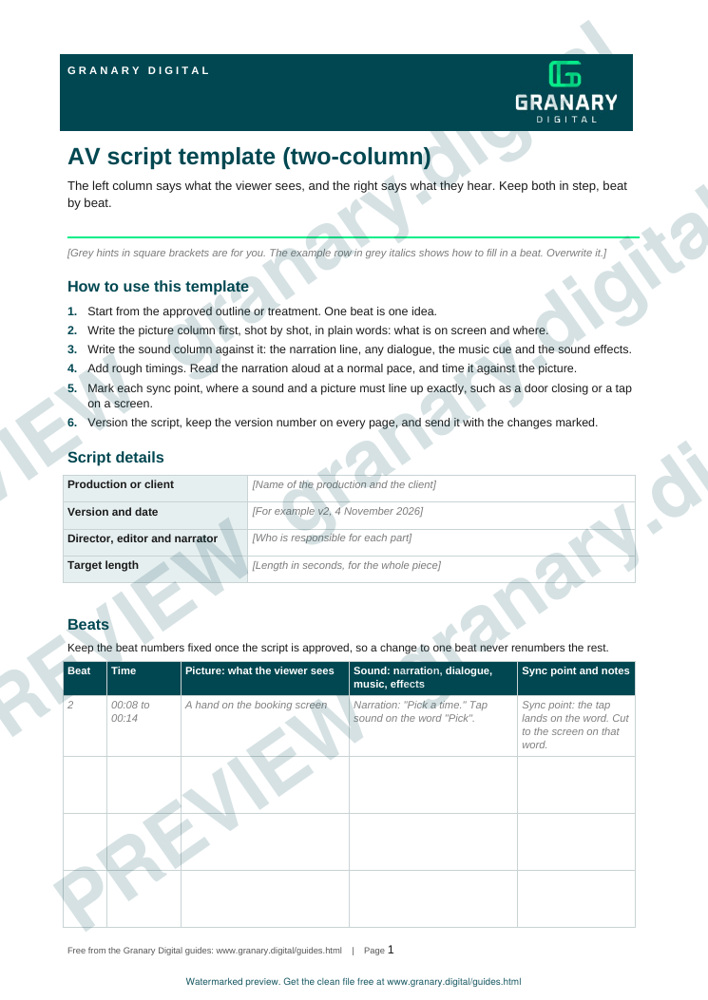
Get the template
The preview is free to look at and print. For the clean file, without the watermark, put your email in and we will send a download link straight away. You also join From the Barn, our monthly studio email, which you can leave whenever you like.
Open the watermarked preview (PDF)
Done. The download link is on its way to your inbox and works for 7 days. If it has not arrived in a few minutes, check your spam folder.
How to write it, step by step
- Start from the approved outline or treatment. One beat is one idea.
- Write the picture column first, shot by shot, in plain words: what is on screen and where.
- Write the sound column against it: the narration line, any dialogue, the music cue and the sound effects.
- Add rough timings. Read the narration aloud and time it against the picture.
- Mark each sync point where a sound and a picture must line up exactly, such as a door closing.
- Version the script and send it to the client with the changes marked.
A worked example
A 60-second explainer for a small firm has six beats. Beat 2 matters most. The picture shows a hand on the booking screen, and the narration says "Pick a time." A tap sound lands on the word, so the sync point is marked in the sound column, and the editor knows to cut to the screen on that word. If the narration runs long, the beat is shortened in the words, not in the picture.
Common mistakes
- Writing the narration before the picture, so the words do not fit the beats.
- Leaving out the timings, which hides a length problem until the edit.
- Not marking sync points, so the editor has to guess.
- Music cues with no in and out points.
- Several versions in circulation with no version number.
If the narration is to be recorded at the barn, the voiceover recording page explains how the session works. The treatment template comes before this script, and the script timing calculator can check the narration against the beats. For the words-to-minutes question, see voiceover script timing.
Related guides
Questions we get asked
What is an AV script?
A two-column script where the left column describes the picture and the right column describes the sound. It is used for films, training videos, corporate films and presentations that combine visuals with narration.
How long should a narration be for each minute of film?
A planning figure of 120 to 150 words a minute suits conversational narration, and fewer if the pictures need room. Read the narration aloud against the picture, time it, and cut words until each beat fits.
Who uses an AV script on a shoot?
The director, the editor, the narrator and the client. The picture column guides the shoot, and the sound column guides the recording and the edit.
granary.digital · 01243 884993 · studio@granary.digital · The Old Grainstore, Adsdean, Chichester, West Sussex, PO18 9DN · Prices exclude VAT unless marked inc VAT