

In short: Write an AI brief as you would brief a camera crew: the goal, the audience, what must not change, the real references, the person who signs off and the format it will run in. A vague prompt gets a vague result. A one-page brief with real reference photographs and named approval steps gets work you can check and use.
Most AI work goes wrong at the brief, not in the tool. The person commissioning it types a sentence, the tool produces something plausible, and nobody agrees what counts as finished. A crew brief solves the same problem for a camera department: it says what the shot is for, what must stay the same, and who decides. The same discipline works for AI.
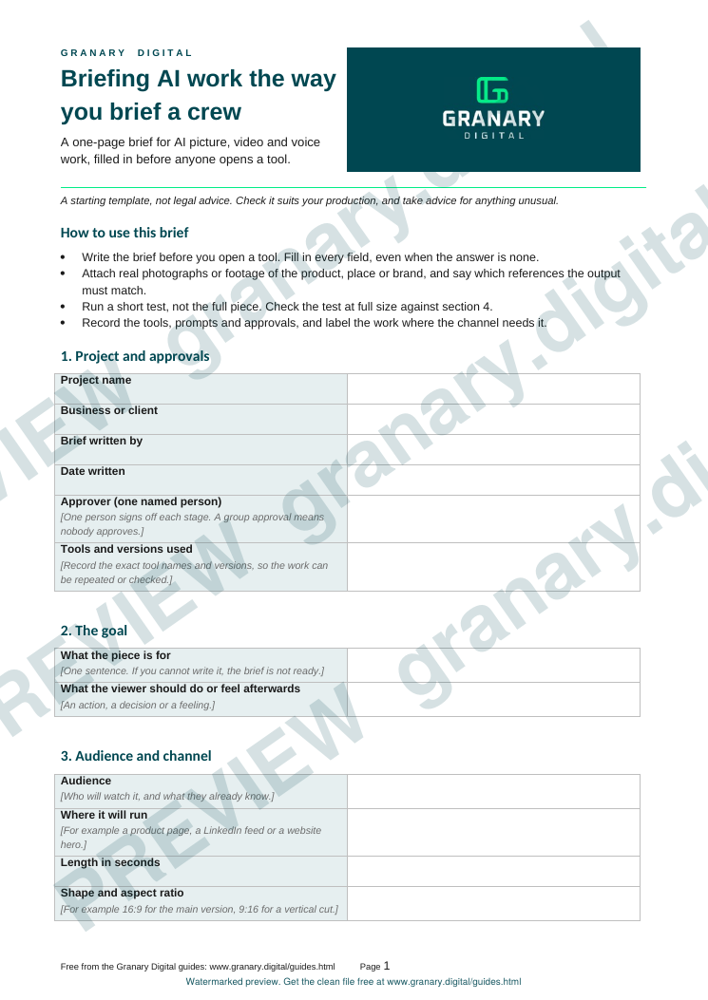
Get the template
The preview is free to look at and print. For the clean file, without the watermark, put your email in and we will send a download link straight away. You also join From the Barn, our monthly studio email, which you can leave whenever you like.
Open the watermarked preview (PDF)
Done. The download link is on its way to your inbox and works for 7 days. If it has not arrived in a few minutes, check your spam folder.
What the brief must answer
- The goal. What the piece is for, and what the viewer should do or feel afterwards.
- The audience and the channel. Where it will run, and at what length and shape.
- What must stay the same. The product's shape, the name, the claims, the people and the places.
- What must not appear. Competitor logos, marks you do not own, and any real person without consent.
- The references. Real photographs or footage of the product, the place and the brand.
- The tools and versions. Which tools made the work, so it can be repeated or checked.
- The approver. One named person who signs off each stage.
- The delivery. Format, frame rate, size, captions and any labels the channel needs.
Step by step
- Write the brief before opening a tool.
- Attach the real references, and say which of them the output must match.
- Run a short test, not the full piece.
- Review the test against the must-stay list, at full size and on the screen it will run on.
- Record the tools, the prompts and the approvals in the project file.
- Label the work where the platform or the audience needs it.
Worked example
A manufacturer wants a 15-second clip for a product page. The brief names the product and attaches four photographs of the real item. It says the shape and the logo must match the photographs, and that one named person approves the first test before the full run. The first test shows the logo wrong. The brief is amended with a line on the logo, the next test matches the photographs, and only then is the full clip made.
Common mistakes
- Sending a brief with no real reference, so the tool invents the product.
- Naming no approver. When everyone approves, nobody does.
- Using a generated face or voice as if it were a cast member, without consent.
- Asking a generator to draw a specific product you own, then trusting the detail. Photograph the real thing instead.
- Skipping the record of what was made, which makes the work hard to defend later.
For an organisation that wants AI built into how it makes content, The AI Studio starts with a one-day AI Strategy Intensive at £7,500 +VAT. A small business can start with AI brand services from £199 a month +VAT. For the stages of a production where AI helps and where it does not, read AI in the production workflow, and compare the brief with how to brief a video shoot.
Related guides
- AI video for small businesses: what's real, what's risky
- When to use AI and when to shoot it for real
- AI in the production workflow, stage by stage
- Who is responsible for an AI-made ad?
- Voice and likeness: a consent and contract checklist
- All guides and tools
The picture at the top of this page is an illustration, not a photograph of a client or a real job.
Questions we get asked
How do I brief an AI video company?
Give the goal, the audience, the must-stay rules, real reference images or footage, the named approver and the delivery format. Test a short version before you commission the full piece.
Why does AI get the product wrong?
A generator makes something that looks like the product, not the product itself. Give it real photographs of the item, and check the detail at full size before approval.
Do I need consent for an AI voice or face?
Yes, when the voice or face belongs to a real person. Get written consent from that person that covers the use you have in mind.
granary.digital · 01243 884993 · studio@granary.digital · The Old Grainstore, Adsdean, Chichester, West Sussex, PO18 9DN · Prices exclude VAT unless marked inc VAT