

In short: Plan a content day by counting set-ups before assets. List every asset with its format, platform and purpose, then group the assets that share a set-up. Give each set-up a time for setting up, shooting and resetting, add a buffer and check the total fits the day. If it does not fit, cut a set-up or move assets to a second day before you cut the brief.
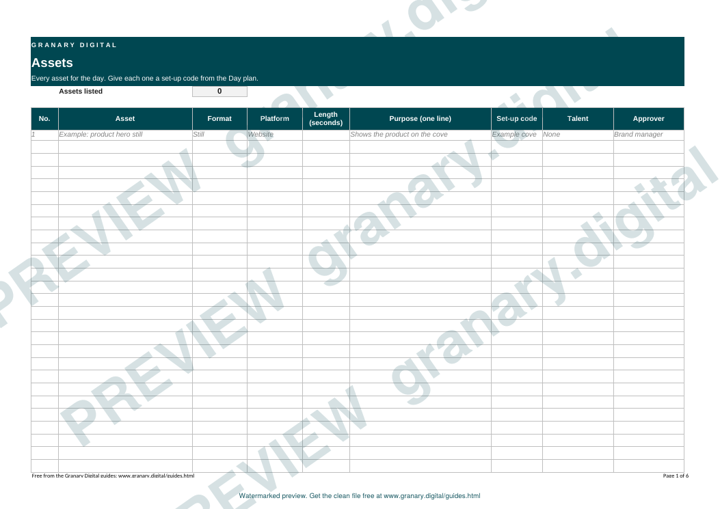
The planner is a single sheet that turns a list of wanted content into a timetable for one shoot day. It works backwards from the set-ups, because the set-ups decide how long the day takes.
What the planner does
Brand teams often ask for a long list: stills, vertical clips, a talking head, a product cut-down and a testimonial. Each item sounds small. Together they decide how many times the crew lights, moves, dresses and resets. The planner makes that visible before the day starts, with one row per asset and one block per set-up.
Get the template
The preview is free to look at and print. For the clean file, without the watermark, put your email in and we will send a download link straight away. You also join From the Barn, our monthly studio email, which you can leave whenever you like.
Open the watermarked preview (PDF)
Done. The download link is on its way to your inbox and works for 7 days. If it has not arrived in a few minutes, check your spam folder.
How to use it, step by step
- List every asset. Write the format (still, clip, interview), the platform, the length and the one-line purpose.
- Group the assets by set-up. Two assets share a set-up when the same light, position, backdrop and talent serve both.
- Give each set-up a block. Note the time to set up, the time to shoot and the time to reset for the next one.
- Add a buffer row. Use it for late talent, a lost prop or a retake.
- Add the total. If it runs past the working day, move assets to a second day or cut a set-up. Do not cut the buffer.
- Name the approver and the time they will look at the rushes.
A worked example
A skincare brand wants 30 assets: 12 stills, 6 vertical clips, 4 talent answers, 4 product cut-downs and 4 testimonial clips. The first draft has five set-ups. The times below are illustrative, for the exercise.
| Set-up | Assets | Set up, shoot, reset |
|---|---|---|
| 1. Cove, product | 6 stills, 6 vertical clips | 60 + 90 + 20 minutes |
| 2. Cove relit, lifestyle | 6 stills | 30 + 60 + 20 minutes |
| 3. Desk, talent | 4 answers | 45 + 60 + 15 minutes |
| 4. Product table | 4 cut-downs | 30 + 45 + 15 minutes |
| 5. Chair, testimonials | 4 clips | 30 + 60 minutes |
That is 9 hours 40 minutes before lunch and a buffer, which does not fit a 10-hour day. The planner shows the fix: the product cut-downs can be shot on the cove in set-up 1, adding 15 minutes there and removing set-up 4. The day drops to about 8 hours 25 minutes of shooting, with room for lunch and a 45-minute buffer. Agree the real set-up and reset times with the producer before you lock the plan.
Common mistakes
- Counting assets, not set-ups. Thirty assets over one set-up is a different day from thirty over six.
- No reset time. Changing a backdrop or a light takes longer than people expect.
- No buffer. Something always overruns, and the last set-up is usually the one that gets cut.
- Too many formats per set-up without a plan for each one.
- No named approver. The rushes come back and nobody knows who signs them off.
If you would rather a studio plans the day with you, the Content Studio page sets out the content day offer. For more than one day, plan a year of content in a day covers the wider schedule. For the shot-level detail, use the shot list and storyboard templates alongside this planner.
Related guides
The picture at the top of this page is an illustration, not a photograph of a client or a real job.
Questions we get asked
How many assets can you shoot in one content day?
It depends on the set-ups, the talent and the turnaround, not on the number of assets alone. Assets that share a set-up are quick to add. Assets that need a new light or a new location are the expensive ones.
What should a content day planner include?
A line for every asset with its format, platform, length and purpose, a set-up column, a time for each set-up, the talent, the approver and a buffer row for delays.
Who should sign off the content plan?
The person who approves the brand's message, named on the plan before the day. Agree how many rounds of changes are allowed afterwards.
granary.digital · 01243 884993 · studio@granary.digital · The Old Grainstore, Adsdean, Chichester, West Sussex, PO18 9DN · Prices exclude VAT unless marked inc VAT