

In short: A crop factor compares a camera's sensor with a 35mm full-frame sensor, and it changes the field of view of a lens. Multiply the focal length by the crop factor for the full-frame equivalent. Super 35 is about 1.46 to 1.53 times, APS-C about 1.5 to 1.6 and Four Thirds about 2. Check the crop in the recording mode you will use.
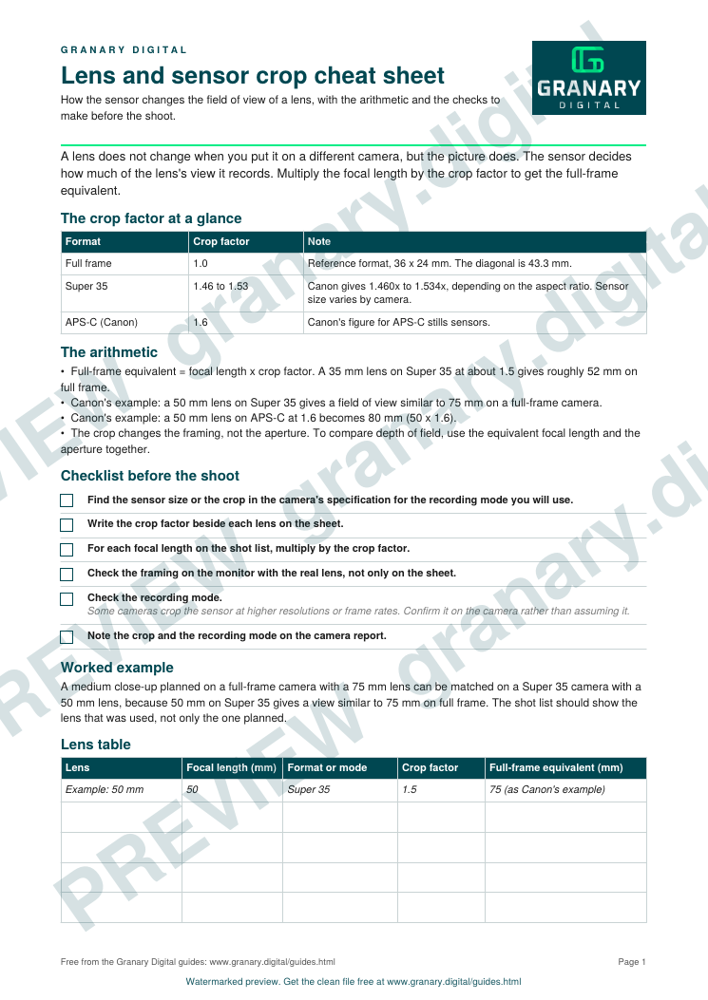
A lens does not change when you put it on a different camera, but the picture does. The sensor decides how much of the lens's view it records, and the crop factor is the number that tells you how much.
The crop factor at a glance
| Format | Sensor size | Crop factor (approx.) |
|---|---|---|
| Full frame | 36 × 24 mm | 1.0 |
| Super 35 | Varies by camera | 1.46 to 1.53 (Canon's range) |
| APS-C (Canon) | 22.2 × 14.8 mm | 1.6 |
| APS-C (general) | 23.7 × 15.6 mm | 1.5 |
| Four Thirds | 17.3 × 13.0 mm | 2.0 |
Get the checklist
The preview is free to look at and print. For the clean file, without the watermark, put your email in and we will send a download link straight away. You also join From the Barn, our monthly studio email, which you can leave whenever you like.
Open the watermarked preview (PDF)
Done. The download link is on its way to your inbox and works for 7 days. If it has not arrived in a few minutes, check your spam folder.
Checklist before the shoot
- Find the sensor size or the crop in the camera's specification for the recording mode you will use.
- Write the crop factor beside each lens on the sheet.
- For each focal length on the shot list, multiply by the crop factor to get the full-frame equivalent.
- Check the framing on the monitor with the real lens, not only on the sheet.
- Check the recording mode. Some cameras crop the sensor at higher resolutions or frame rates, so confirm it on the camera rather than assuming it.
- Note the crop and the recording mode on the camera report.
A worked example
A 50mm lens on Super 35 gives a view similar to 75mm on full frame, according to Canon's guide. A medium close-up planned on a full-frame camera with a 75mm lens can be matched on a Super 35 camera with a 50mm lens. The shot list should show the lens that was used, not only the one planned.
Common mistakes
- Using a stills crop factor for video, or the reverse.
- Quoting a sensor size from a product page instead of the recording mode in use.
- Forgetting the crop when mixing lenses from different formats on the same day.
- Assuming a 4K crop mode uses the whole sensor.
- Writing the focal length without the crop, so the camera report cannot be read later.
The field of view calculator does the same arithmetic across a range of sensors, and the depth of field calculator takes the aperture into account.
Sources
- Wikipedia, Crop factor, read 5 November 2026
- Canon Europe, Full-frame vs Super 35mm: which sensor size should filmmakers choose?, read 5 November 2026
Related guides
- Field of view and focal length calculator, by sensor
- Depth of field calculator, with a worked example
- Data rate and storage calculator for camera files
- Frame rates and shutter: the 180 degree rule and flicker-free shutters for UK 50Hz
- Camera report template: what to log on each take
- All guides and tools
The picture at the top of this page is an illustration, not a photograph of a client or a real job.
Questions we get asked
What is a crop factor?
The ratio between the diagonal of a 35mm full-frame sensor, 43.3mm, and the diagonal of the sensor in question. A larger crop factor gives a narrower field of view for the same lens.
How do I work out the equivalent focal length?
Multiply the lens's focal length by the crop factor. A 35mm lens on Super 35 at about 1.5 gives roughly 52mm on full frame.
Does the crop change the depth of field?
The crop changes the framing, not the lens's aperture. To compare depth of field, use the equivalent focal length and the aperture together, and check the result with the depth of field calculator.
granary.digital · 01243 884993 · studio@granary.digital · The Old Grainstore, Adsdean, Chichester, West Sussex, PO18 9DN · Prices exclude VAT unless marked inc VAT