

In short: A camera report is the log kept for each shoot day. It records every card or roll, each clip and take, the lens and the settings, and which takes are circled as usable. Fill it in at the time, match it to the slate and hand it over with the cards. The editor relies on it when matching shots.
A camera report is the shoot's memory of the camera. If a take is missing from the edit, or the grade does not match, the report is one of the first places to look.
What the camera report records
Get the template
The preview is free to look at and print. For the clean file, without the watermark, put your email in and we will send a download link straight away. You also join From the Barn, our monthly studio email, which you can leave whenever you like.
Open the watermarked preview (PDF)
Done. The download link is on its way to your inbox and works for 7 days. If it has not arrived in a few minutes, check your spam folder.
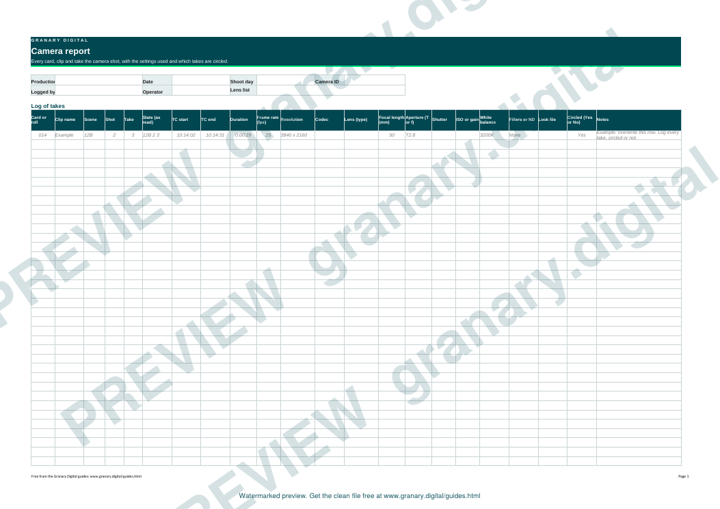
The report typically holds the date, the production and the shoot day, the camera ID, the card or roll number, the clip name, the scene, shot and take, the slate, the timecode at the start and end, the frame rate and resolution, the codec, the lens and focal length, the aperture, shutter, ISO or gain, white balance, filters including any neutral density filter, the look file, the circled takes and the notes.
How to fill it in, step by step
- Before the first take, set the header: the production, the date, the camera ID and the lens list.
- Record the card number and the starting timecode before the first take on that card.
- After each take, log the scene, shot, take number and slate, matching what the clapper said.
- Log any setting change as it happens, including frame rate, white balance, shutter and filter. A change that is not logged causes a problem later, when the edit cannot match the look.
- Circle takes only after the director or operator has decided.
- At wrap, check that every card in the report has an offload entry and that the clip count matches the cards.
A worked example
Card 014, camera A. Scene 12B, shot 2, take 3, slate read aloud at the start. Frame rate 25 frames per second, white balance set to 3200K for the tungsten practicals, lens 50mm at T2.8. The director circles take 3 after the playback.
Take 4 is a flub, where the actor drops a line at 00:01:12. It is logged anyway, with that note, so the editor knows it was tried and why it was not used.
Common mistakes
- Logging takes from memory at the end of the day.
- Not logging a setting change, so the edit cannot match the look between two takes.
- Starting a new card without logging its number.
- Circling takes before the director has decided.
- Keeping the report on the camera's laptop rather than with the cards.
The offload log template covers the copying side, and the daily production report records the camera figures for the whole day. The camera glossary defines the settings used in the report.
Related guides
- Field of view and focal length calculator, by sensor
- Depth of field calculator, with a worked example
- Data rate and storage calculator for camera files
- Frame rates and shutter: the 180 degree rule and flicker-free shutters for UK 50Hz
- Lens and sensor crop cheat sheet
- All guides and tools
The picture at the top of this page is an illustration, not a photograph of a client or a real job.
Questions we get asked
Who fills in the camera report?
Usually the camera assistant (the clapper loader, or 2nd AC), with the operator confirming the circled takes. Agree who does it at the start of the day, because crews differ.
What is the difference between a camera report and an offload log?
A camera report records the shooting: what was shot, with which lens and settings. An offload log records the copying: which cards were copied, where they went and whether the copies match the originals.
Should I circle every take?
Circle only the takes the director and operator want to use. Log every take, circled or not, so the editor can see what was tried.
granary.digital · 01243 884993 · studio@granary.digital · The Old Grainstore, Adsdean, Chichester, West Sussex, PO18 9DN · Prices exclude VAT unless marked inc VAT