

In short: Record every presentation, even if it is audio only. Watch it once with the sound off, once with the sound on and once with the picture off. Use the sheet to note tics, fidgets, eyeline, pace and reactions, then choose three changes for the next run and rehearse only those.
Recording a talk is the fastest way to see what you do without knowing it. You will fidget, look at the wrong place or speed up in the middle of a point, and you will not notice until you watch it back. A self-review sheet makes the watch useful by asking the same questions every time.
Before you watch
Record every presentation, even if it is audio only. Present Yourself's advice is to record every presentation, including audio-only talks, so that you can hear the tics and the places where the voice drops. If someone else will watch too, tell them what to look for before they start, so the feedback is about the points you asked about.
Watch in passes rather than all at once. A first watch with the sound off shows your body and eyeline. A second watch with the sound on shows the words and the pace. A third with the picture off shows the voice on its own, which Present Yourself suggests is a good test in its own right.
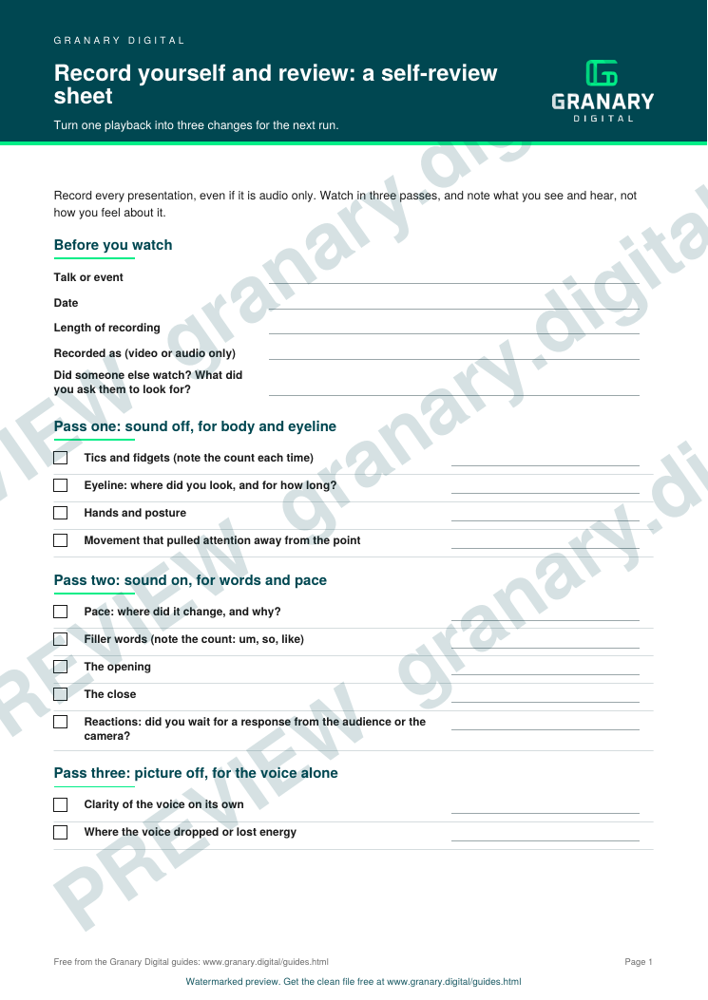
Get the template
The preview is free to look at and print. For the clean file, without the watermark, put your email in and we will send a download link straight away. You also join From the Barn, our monthly studio email, which you can leave whenever you like.
Open the watermarked preview (PDF)
Done. The download link is on its way to your inbox and works for 7 days. If it has not arrived in a few minutes, check your spam folder.
How to fill it in
- Note what you saw, not how you felt. "Looked left for the whole second section" is useful. "I looked nervous" is not.
- Mark each tic and fidget the first time you see it, then count how often it repeats.
- Note the places where your pace changes, and where you use filler words.
- Note your reactions to the audience or the camera. Did you wait for a reaction, or did you carry on?
- Note the opening and closing. These are what people remember.
A worked example
Say the sheet shows that your eyes went to the left monitor for the whole of the middle section, and that you said "so" at the start of every point. The first is an eyeline problem. Move the notes to the side of the camera, or put the call window under the webcam, as the guide to eye contact with a lens explains. The second is a filler habit. Replace the "so" with a pause, as the guide to cutting fillers covers. Those two changes go into the next rehearsal.
Turn it into three changes
Pick three changes from the sheet, ranked by how much each one would help the audience. Write them at the top of your script. Rehearse only those three in the next run, then review again. Present Yourself's approach is to celebrate what went well and then fix what needs improving, so write down one thing that worked as well as the three changes.
Common mistakes
- Watching everything at once. A full watch in one go is overwhelming, and the sheet ends up half filled.
- Watching only the bad moments. The good moments show what to keep.
- Trying to fix ten things. Three changes are enough to notice. Ten are impossible to hold in a talk.
- Judging the voice on the first watch. Your voice always sounds odd to you. Listen again before you decide.
For the feedback step, read feedback that helps: celebrate and fix. For the run-through and the rehearsal, read rehearsal vs run-through.
Related guides
- Rehearsal vs run-through: what the crew needs from you
- Feedback that helps: celebrate and fix
- All guides and tools
The picture at the top of this page is an illustration, not a photograph of a client or a real job.
Questions we get asked
How do I review a recording of my own presentation?
Watch it in passes: once with the sound off for body and eyeline, once with the sound on for words and pace, and once with the picture off for the voice alone. Note what you see and hear on the sheet, not what you feel about it.
Should I ask someone else to watch my recording?
Yes, if you ask them to watch for something in particular. Present Yourself's advice is to ask for feedback beforehand and name what to watch for, rather than asking for general comments.
How many things should I change after a recording?
Three. Choose the three most useful, rehearse those, and leave the rest for later sessions.
granary.digital · 01243 884993 · studio@granary.digital · The Old Grainstore, Adsdean, Chichester, West Sussex, PO18 9DN · Prices exclude VAT unless marked inc VAT