

In short: Tracking markers and clean plates are the raw material for visual effects. Agree the camera move and the tracked area with the visual effects supervisor first, place the markers where the camera will see them but actors will not stand, lock the lighting, and record the camera and lens data for every shot. Missing records cause more problems than missing markers.
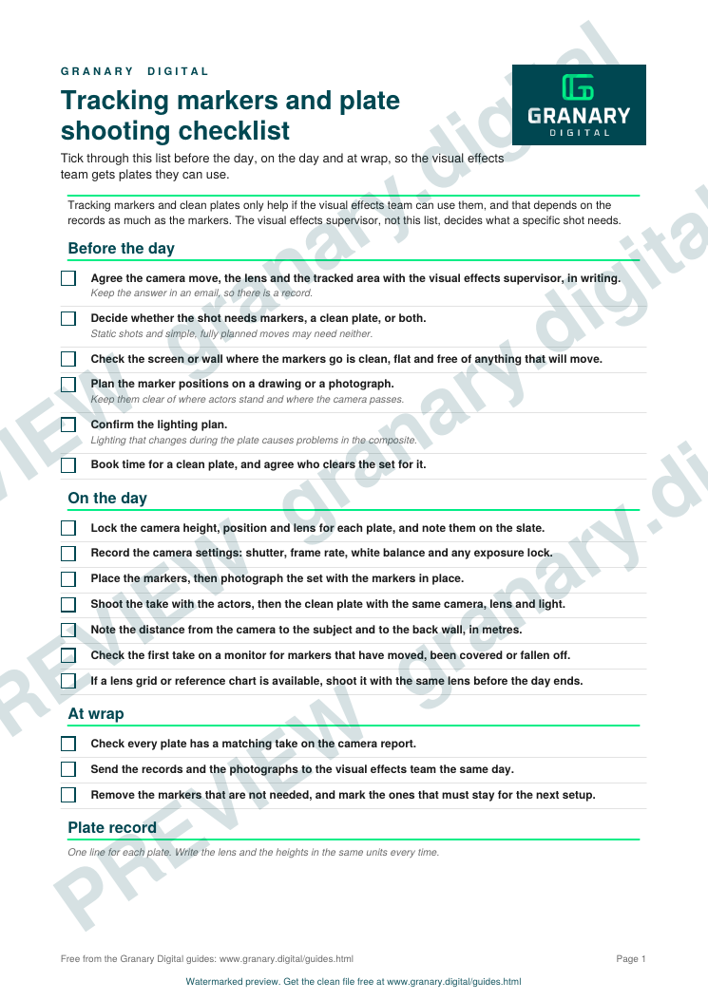
Tracking markers and clean plates only help if the visual effects team can use them, and that depends on the records as much as the markers. This checklist sets out the checks to make before the day, on the day and at wrap. It is general guidance. The visual effects supervisor, not this list, decides what a specific shot needs.
What the checklist is for
The checklist makes sure the camera, lens, lighting and marker positions are recorded in the same way for every shot. It also gives the crew one shared list to tick through, so nothing is left to memory when the set is busy.
Get the checklist
The preview is free to look at and print. For the clean file, without the watermark, put your email in and we will send a download link straight away. You also join From the Barn, our monthly studio email, which you can leave whenever you like.
Open the watermarked preview (PDF)
Done. The download link is on its way to your inbox and works for 7 days. If it has not arrived in a few minutes, check your spam folder.
Before the day
- Agree the camera move, the lens and the tracked area with the visual effects supervisor, in writing.
- Decide whether the shot needs markers, a clean plate, or both.
- Check the screen or wall where markers go is clean, flat and free of anything that will move.
- Plan marker positions on a drawing or a photograph, and keep them clear of where actors will stand and where the camera will pass. Use small markers that contrast with the screen, such as tape crosses in a different shade, and only as many as the track needs, so they are quick to paint out.
- Confirm the lighting plan. Lighting that changes during the plate will cause problems in the composite.
- Book time for a clean plate, and agree who clears the set for it.
On the day
- Lock the camera height, position and lens for each plate, and note them on the slate.
- Record the camera settings: shutter, frame rate, white balance and any exposure lock.
- Place the markers, then take a photograph of the set with the markers in place.
- Shoot the take with the actors, then the clean plate with the same camera, lens and light.
- Note the distance from the camera to the subject and to the back wall, in metres.
- Check the first take on a monitor for markers that have moved, been covered or fallen off.
- If a lens grid or reference chart is available, shoot it with the same lens before the day ends.
At wrap
- Check every plate has a matching take on the camera report.
- Send the records to the visual effects team the same day, with the photographs.
- Remove the markers that are not needed, and mark the ones that must stay for the next setup.
Worked example
A car interior, shot on a green screen with a window plate to follow.
- The 35 mm lens is locked with the camera at 1.2 m height, 2.4 m from the windscreen frame.
- Markers sit on the window frame and the dashboard, not on the seats where the actors will sit.
- The clean plate is shot with the car interior empty, using the same lens, height and light.
- The slate for each plate records the take, the lens, the camera height and the distances.
The visual effects team can now match the window plate to the camera move, even though the actors were not in the same position for the plate.
Common mistakes
- Placing markers in the spot the actor will stand, so they are covered or removed.
- Changing the lighting between the actor take and the clean plate.
- No record of the lens or camera height, which makes the move impossible to match.
- Skipping the clean plate to save time, then needing it in post.
- Leaving markers on the screen when the next shot needs a clean background.
For the wider green screen set-up, see green screen done right. If the plates are for an LED wall, the pixel pitch and viewing distance calculator and moiré, refresh and shutter on LED walls cover the screen side of the job.
Related guides
Questions we get asked
What are tracking markers used for on a shoot?
They give the visual effects software reference points, so that a camera's movement can be matched when a new background is added. They are placed on a set, a green screen or a wall, and removed or covered in post.
What is a clean plate?
A clean plate is a shot of the same set without the actors, or with them out of frame, so that the visual effects team has the background to work with. It is shot with the same camera, lens and lighting as the main take.
Do you need tracking markers for every visual effects shot?
No. Static shots and shots with simple, fully planned moves may need none. Ask the visual effects supervisor before the day, because markers can change the look of a set.
granary.digital · 01243 884993 · studio@granary.digital · The Old Grainstore, Adsdean, Chichester, West Sussex, PO18 9DN · Prices exclude VAT unless marked inc VAT