

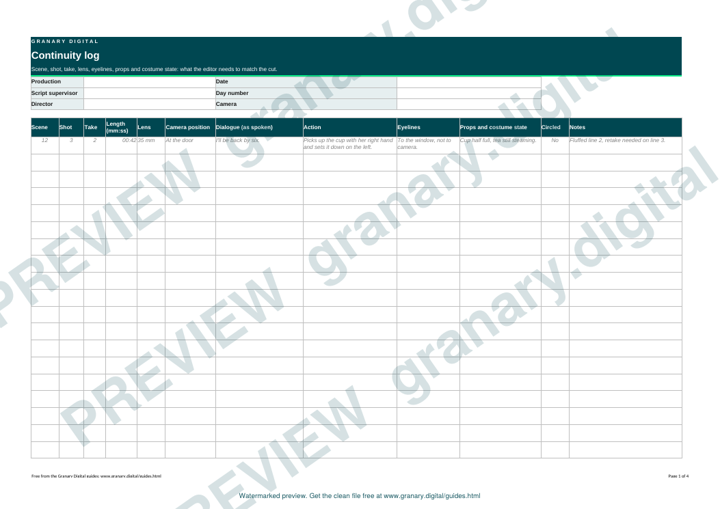
In short: A continuity log records each take's scene, shot, take, length, lens and position, the dialogue and action, the eyelines and the props and costume state. Fill it in as the take happens, circle the takes the director chooses, and note any change that affects the edit. The log is what stops a glass moving from full to empty between two shots.
What the log is for
The editor cuts between takes that were shot at different times. If the log says a cup was half full in take 3 and empty in take 4, the editor can choose the right pair. Without the log, the cut relies on memory, and memory is wrong by lunchtime. The log is the record of what the camera saw.
Get the template
The preview is free to look at and print. For the clean file, without the watermark, put your email in and we will send a download link straight away. You also join From the Barn, our monthly studio email, which you can leave whenever you like.
Open the watermarked preview (PDF)
Done. The download link is on its way to your inbox and works for 7 days. If it has not arrived in a few minutes, check your spam folder.
Fields to fill in
| Field | What to write |
|---|---|
| Scene and shot | From the call sheet and the shot list |
| Take | The take number, including any pickups |
| Length | The length of the take, from the slate or the clock |
| Lens and position | The focal length and where the camera sat |
| Dialogue | Any line that differs from the script, written as spoken |
| Action | Where each person moves, and what they do with their hands |
| Eyelines | Where each actor looks, and any change from the take before |
| Props and costume | The state of each prop and garment, such as a glass half full |
| Circled | Whether the director has chosen the take |
| Notes | Any change that affects the edit, such as a cough or a cut line |
A worked example
Scene 12, shot 3, take 2, length 42 seconds, 35 millimetre lens, camera at the door.
- Dialogue: "I'll be back by six." The script says "before six", so the change is noted.
- Action: she picks up the cup with her right hand and sets it down on the table to her left.
- Eyeline: to the window, not to the camera.
- Props: cup half full, tea still steaming.
- Circled: no. Note: "Fluffed the second line, go again."
The note makes the next take easy to match and tells the director what to fix.
How to use it on set
- Before the first take of a shot, check the previous take's log and the call sheet.
- Fill in the log as each take happens, not at the end of the setup.
- Mark the take the director circles, and write any fault in plain words.
- Check the props and the costume state against the last take before each new take.
- Send the log with the files at the end of the day.
Common mistakes
- Logging only the circled takes. The editor needs the failed ones to match a cut.
- Writing "same as before" for a prop or an eyeline. Describe the state.
- Missing a line that differs from the script. The editor cuts to the words actually spoken.
- Forgetting the screen direction when a character crosses the frame.
- Leaving out the length, which the editor uses to plan the cut.
For the wider daily record, the script supervisor's daily report covers the day as a whole, and the what does a script supervisor do page explains the role.
Related guides
Questions we get asked
What does a continuity log record?
For each take, the scene and shot, the take number and length, the lens and camera position, the dialogue and action, the eyelines and screen direction, the props and costume state, and the director's choice.
Who fills in the continuity log?
The script supervisor fills it in on set. The editor and the director use it after the shoot to match shots and choose takes.
Do you need a continuity log on a small shoot?
Yes, if the piece has more than one shot of the same action. A short talking-head piece needs less, but a note of each take saves time in the edit.
granary.digital · 01243 884993 · studio@granary.digital · The Old Grainstore, Adsdean, Chichester, West Sussex, PO18 9DN · Prices exclude VAT unless marked inc VAT