

In short: A shot list is a table with one row per shot. Give each shot a scene and shot number, size, angle, lens, one line on the action, movement, lighting setup, estimated time and status. Order the shots by setup, not script order, and keep one master copy that the whole crew reads.
What the template is for
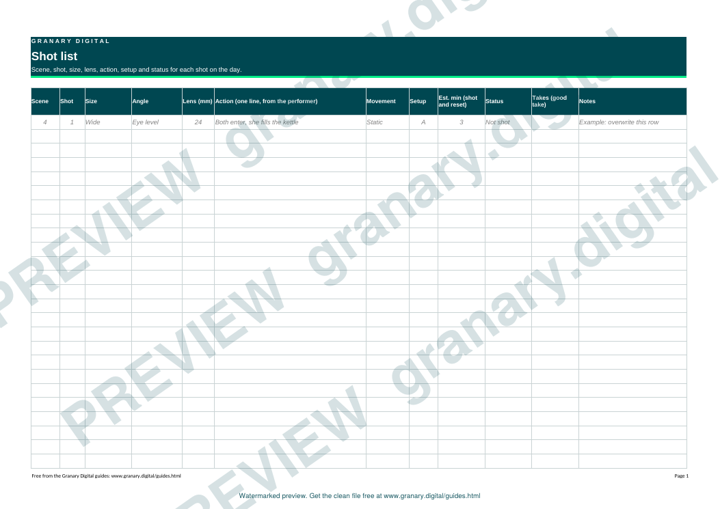
The template is a spreadsheet with one row per shot. On the day it answers four questions: what we shoot next, what it needs, which take is the good one, and what is left before we wrap. It works the same way for a drama scene, an interview or a product shoot.
Get the template
The preview is free to look at and print. For the clean file, without the watermark, put your email in and we will send a download link straight away. You also join From the Barn, our monthly studio email, which you can leave whenever you like.
Open the watermarked preview (PDF)
Done. The download link is on its way to your inbox and works for 7 days. If it has not arrived in a few minutes, check your spam folder.
Who uses it
The director and the director of photography plan the coverage in it. The first assistant director runs the day from it. The camera operator and focus puller check the lens and the size of each shot. The gaffer checks which setup needs which lights, and the editor later uses the take numbers to find the performances.
How to fill it in
- Break the script into scenes. Give each scene a number that matches the call sheet and the script.
- Under each scene, list the shots you need in the order you will shoot them. Group the shots that share a setup, so the lights stay put while the camera works through them.
- For each shot, write the size (wide, mid, close-up), the angle and the lens in millimetres. Write the lens you will actually use on the camera you have, not the one you would prefer.
- Describe the action in one line, from the performer's point of view. "She puts the kettle on and stops" is more useful than "camera pushes in".
- Add the movement (static, pan, dolly, handheld) and a rough time in minutes for the shot and its reset.
- Set the status to not shot, shot, good take or print, and update it at each wrap.
A worked example
Scene 4 is a short kitchen argument on the cove. Shots 1 and 2 share setup A, so the lights are set once and the camera covers both.
| Scene | Shot | Size | Angle | Lens | Action | Move | Setup | Est. min | Status |
|---|---|---|---|---|---|---|---|---|---|
| 4 | 1 | Wide | Eye level | 24 mm | Both enter, she fills the kettle | Static | A | 3 | Not shot |
| 4 | 2 | Mid, her | Eye level | 50 mm | She reaches for the mug and stops | Static | A | 2 | Not shot |
| 4 | 3 | Mid, him | Three-quarter | 50 mm | He turns to the door | Dolly in | B | 4 | Not shot |
Shot 3 needs setup B, so the lights for that side of the room are re-set before it. Plan the reset time in the estimate, not as an afterthought.
Common mistakes
- Numbering shots as they occur to you, then renumbering on the day and losing track of which take belongs to which shot.
- Leaving out the lens, so the camera team cannot prep the right lenses before the day.
- Estimating time from the length of the script page. A new setup often costs more time than the shot itself.
- Keeping three copies on three phones. Keep one master file and let everyone download the same version each morning.
Where it fits
A shot list works best with a coverage plan and a floor plan. Read coverage explained: master, singles and inserts before you decide how many shots a scene needs, and blocking diagrams for a studio to show where people stand. The storyboard sheets page covers the drawings that often sit beside the list. For the first-assistant side of the day, see 1st AD set etiquette and calls.
Related guides
Questions we get asked
What should a shot list include?
A shot number, scene, size, angle, lens, action, movement, setup, estimated time and a status column. Those are the fields the crew needs on the day.
Should the shot list follow the script order?
No. Group shots by setup so the lights and the camera move as few times as possible, and keep the script scene numbers so you can check coverage against the script.
granary.digital · 01243 884993 · studio@granary.digital · The Old Grainstore, Adsdean, Chichester, West Sussex, PO18 9DN · Prices exclude VAT unless marked inc VAT