

Video specs cheat sheet for TikTok, Reels, YouTube and LinkedIn
The settings that hold across most platforms, and the limits as checked on 5 November 2026. CTV is not covered here, so take its delivery spec from the broadcaster or platform.
In short: For YouTube, export an MP4 with H.264 video at your shooting frame rate and AAC audio at 48 kHz, at 8 Mbps for 1080p. TikTok non-Spark ads accept up to 10 minutes and 500 MB. Sprout Social lists LinkedIn in-feed video at up to 10 minutes and 5 GB. Limits change, so check each help page on upload day.
A cheat sheet is only as good as its last check. The settings below hold for most of the platforms, but the limits are the part that changes, so each figure is labelled with the page it came from.
What holds across platforms
- Deliver an MP4 container, with the frame rate matching what you recorded.
- Use AAC audio at 48 kHz, which is what YouTube recommends.
- Keep one master at the highest quality you shot, and export each platform version from it.
- Export vertical short-form video at 1080 by 1920 pixels. This is the export size we use, not a platform rule.
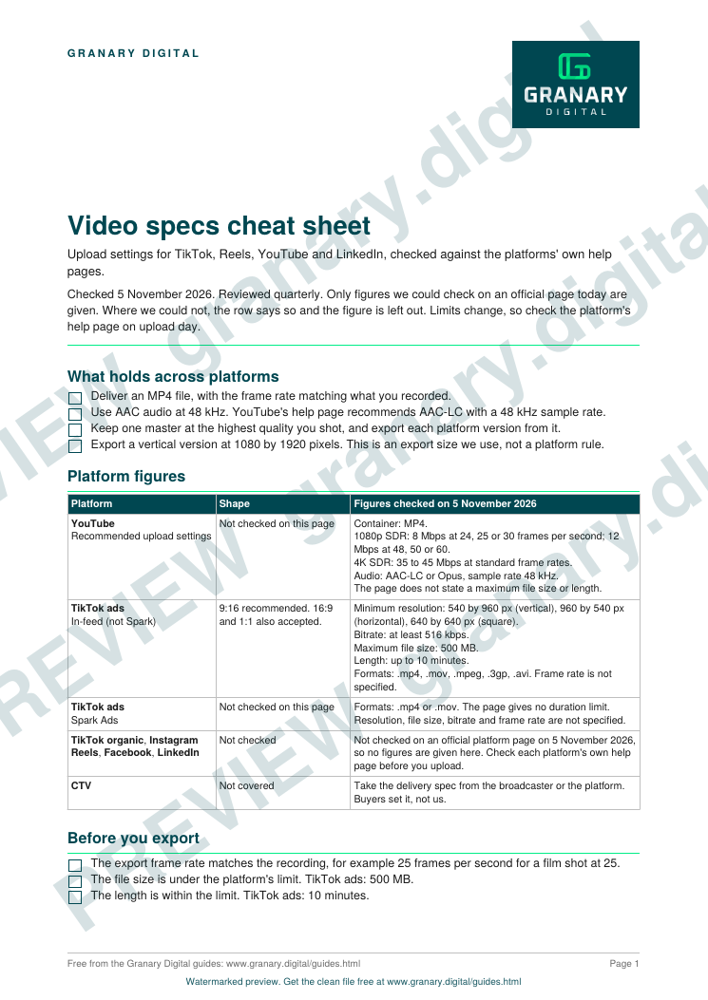
Get the checklist
The preview is free to look at and print. For the clean file, without the watermark, put your email in and we will send a download link straight away. You also join From the Barn, our monthly studio email, which you can leave whenever you like.
Open the watermarked preview (PDF)
Done. The download link is on its way to your inbox and works for 7 days. If it has not arrived in a few minutes, check your spam folder.
Platform limits as checked on 5 November 2026
| Platform | Ratio | Recommended or minimum | Max file size | Max length |
|---|---|---|---|---|
| YouTube | 16:9 on computers | 1080p SDR 8 Mbps; 4K SDR 35 to 45 Mbps | Not on the page checked | Not on the page checked |
| TikTok non-Spark ads | 9:16 recommended | Minimum 540 by 960 px for vertical; bitrate at least 516 kbps | 500 MB | Up to 10 minutes |
| TikTok organic | 9:16 | 1080 by 1920 px | Not published | 10 minutes in the app; 60 minutes uploaded |
| Instagram Reels | 9:16 | 1080 by 1920 px | Not published | Sprout lists 20 minutes in the app and advises under 3 minutes for new audiences. Instagram's own help page gives 3 minutes, so check Instagram before you plan a long Reel |
| Facebook video and Reels | 9:16 | 1080 by 1920 px | 4 GB | No limit in the app |
| LinkedIn in-feed | 1:2.4 to 2.4:1 | 256 by 144 px to 4096 by 2304 px | 5 GB | 3 seconds to 10 minutes |
| CTV | Not checked | Use the broadcaster's or platform's delivery spec |
The TikTok ad figures come from TikTok's own help centre and apply to non-Spark ads. The Instagram, Facebook, TikTok organic and LinkedIn rows come from Sprout Social's platform table, which cites native limits as of October 2026. They are third-party figures, not checked on the platforms' own help pages, and the printable sheet leaves them out for that reason. The YouTube figures come from YouTube's help page.
How to use the cheat sheet, step by step
- Note the platforms in the plan and the ratio each one needs, using the aspect ratios page.
- Export the master once, then each platform file from it.
- Check the file size and length against the row for each platform before you export.
- Confirm the frame rate of the export matches the recording.
- Check the platform's own help page for any figure that matters to a deadline.
A worked example
A 60-second film is shot at 25 frames per second. The team exports a 16:9 master at 25 frames per second for YouTube and for the LinkedIn feed, which sits inside the 10-minute length Sprout Social lists for LinkedIn. For TikTok and Reels they export a 1080 by 1920 cut from the same edit, then check that it sits well under TikTok's 500 MB limit for non-Spark ads before upload.
Common mistakes
- Exporting at a frame rate you did not shoot, such as converting 25 to 30 without a reason.
- Checking the limits once and assuming they stay the same.
- Leaving the file size check until after the export has been queued.
- Treating a third-party figure as the platform's own rule without checking the platform's help page.
- Writing one set of settings for CTV. Broadcast and streaming delivery specs are set by the buyer.
Granary's Content in a Day includes six captioned short-form cuts alongside the edited episode. The deliverables spec sheet template is the place to record which files the client expects.
Sources
- YouTube Help, Recommended upload encoding settings, read 5 November 2026
- TikTok for Business Help Centre, Auction in-feed ads, read 5 November 2026
- Instagram Help Centre, Record a reel on Instagram, read 5 November 2026
- Sprout Social Insights, social video specifications (native limits as of October 2026), read 5 November 2026
Related guides
The picture at the top of this page is an illustration, not a photograph of a client or a real job.
Questions we get asked
What file format should I export for social video?
MP4 with H.264 video and AAC audio is the format YouTube recommends. TikTok's ad guidance accepts MP4 and MOV, among other formats.
What is the maximum file size for a LinkedIn video?
Sprout Social's platform table lists 5 GB for in-feed video, with a length of 3 seconds to 10 minutes. Check LinkedIn's own help page before a large upload.
How long can a TikTok video be?
For non-Spark ads, up to 10 minutes, according to TikTok's ad guidance. For organic posts, Sprout Social's table lists up to 10 minutes recorded in the app and up to 60 minutes when uploaded.
granary.digital · 01243 884993 · studio@granary.digital · The Old Grainstore, Adsdean, Chichester, West Sussex, PO18 9DN · Prices exclude VAT unless marked inc VAT