

Costume continuity sheet: a template for every look
A costume continuity sheet records what each actor wears in each shot, so a jacket buttoned in one take is still buttoned in the next. Start it at the first fitting, not on the day.
In short: A costume continuity sheet records each character's garments, their state and any accessories in every shot, with photographs of the look. Fill in the sheet after each take, and check it against the previous day before the first shot of the morning. Continuity errors show on screen, so the sheet is the record that stops them.
What the sheet is for
Continuity errors are some of the most visible mistakes on screen: a watch on one wrist in one shot and the other in the next, or a jacket open in a close-up and closed in the wide. The sheet is the record the wardrobe team uses to prevent them. It works with the continuity log that the script supervisor keeps, and the two should agree.
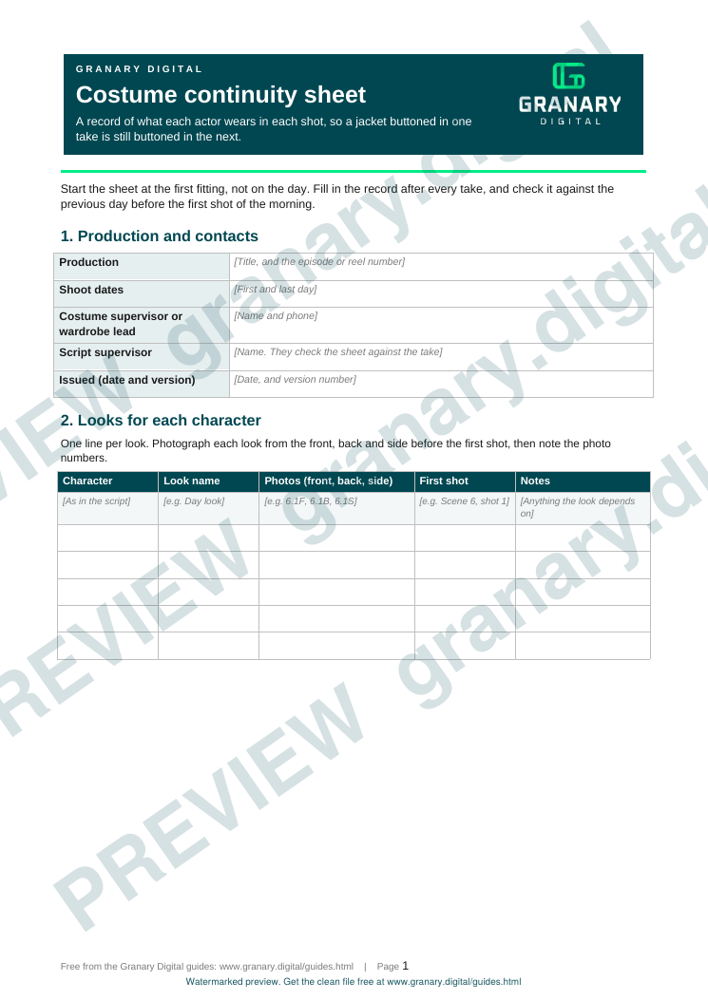
Get the template
The preview is free to look at and print. For the clean file, without the watermark, put your email in and we will send a download link straight away. You also join From the Barn, our monthly studio email, which you can leave whenever you like.
Open the watermarked preview (PDF)
Done. The download link is on its way to your inbox and works for 7 days. If it has not arrived in a few minutes, check your spam folder.
Columns to fill in
| Column | What to write |
|---|---|
| Scene and shot | The scene number and the shot, from the call sheet |
| Character | The name as it appears in the script |
| Garment | Each item with colour and detail, such as "navy wool jacket, two buttons" |
| State | Buttoned, open, sleeves rolled, tucked or untucked |
| Accessories on the body | A watch, glasses, a ring, a bag or a phone, and which hand or shoulder |
| Damage or dirt | Any tear, stain, wet patch or dust, and where it is |
| Photos | The reference numbers for the front, back and side |
| Take | The take on which the look was last confirmed |
A worked example
A character wears a grey coat into a room and takes it off in the second shot.
- Scene 6, shot 1: "Grey wool coat, buttoned to the second button, bag on left shoulder. Photos 6.1F and 6.1B."
- Scene 6, shot 2: "Coat over left arm, cream blouse, sleeves down, bag moved to right shoulder. Photo 6.2."
The second line records the bag move, which is the detail that gets missed when the sheet only lists garments.
How to use it on set
- Before the first shot of each character, photograph the look from the front, back and side, and note the photo numbers.
- After every take, record the state of each garment, not only the takes that will print.
- Check the sheet against the previous day before the first shot of the morning.
- Share the sheet with the director of photography and the script supervisor at lunch and at wrap.
Common mistakes
- Relying on memory for a blouse that was tucked in an earlier take.
- Recording the look only at the start of the day.
- Writing "same as before" instead of describing the look.
- Forgetting small items on the body, such as a watch, glasses or a ring.
- Leaving out the back view, which shows in a wide shot as the character turns.
For wardrobe on a green screen, the green screen wardrobe rules page covers which colours to avoid, and the script supervisor's daily report shows how the same day is logged from the other side.
Related guides
The picture at the top of this page is an illustration, not a photograph of a client or a real job.
Questions we get asked
What does a costume continuity sheet record?
Each character's garments in each shot, with their state (buttoned, tucked, sleeves rolled), any accessories on the body, any damage or dirt, and photographs of the look.
Who keeps the costume continuity sheet?
The costume supervisor or the wardrobe team usually keeps it. The script supervisor checks the sheet against the take, because they have the log of the same shots.
Do you need a costume sheet on a small shoot?
Yes, if the same person appears in more than one shot or on more than one day. A single piece to camera needs far less, but a photograph of the look helps when you shoot again.
granary.digital · 01243 884993 · studio@granary.digital · The Old Grainstore, Adsdean, Chichester, West Sussex, PO18 9DN · Prices exclude VAT unless marked inc VAT