

In short: A credits order worksheet lists every credited name in the order it will appear: opening credits, closing credits and the end crawl. Work from the contracts and the crew list, not memory. Agree the order and spellings with the producer and the client, check each name against the source, and lock the sheet before the final graphics are made.
The credits are the last thing the audience reads and one of the first things a crew member checks. Get the order and the spellings right before the graphics are made, because changing them after the picture is locked costs time and money. A credits order worksheet keeps the whole list in one place, so the order can be agreed and signed off.
What the worksheet covers
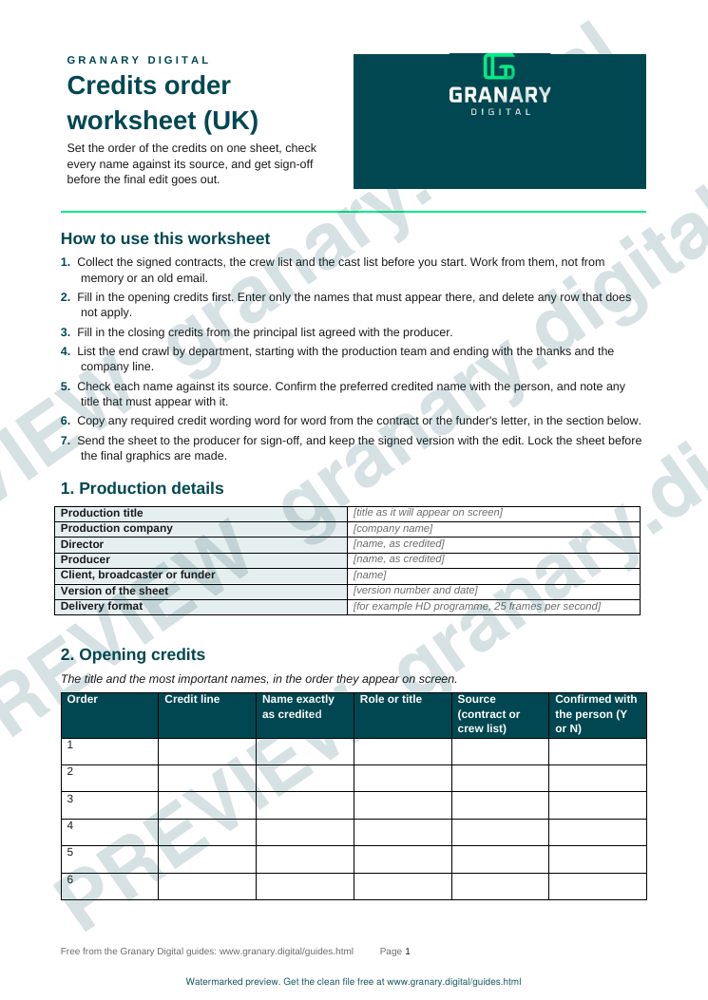
A common layout has three parts, and the StudioBinder template follows the same split. The opening credits carry the title and the most important names. The closing credits, which some productions call the pre-crawl, carry the principal people. The end crawl lists the rest of the crew by department and position. Short films and online pieces often fold these into two parts, so follow what the contract and the client ask for. The worksheet has one section for each part, with the order set line by line.
Get the template
The preview is free to look at and print. For the clean file, without the watermark, put your email in and we will send a download link straight away. You also join From the Barn, our monthly studio email, which you can leave whenever you like.
Open the watermarked preview (PDF)
Done. The download link is on its way to your inbox and works for 7 days. If it has not arrived in a few minutes, check your spam folder.
How to build it, step by step
- Collect the source material: the signed contracts, the crew list, the cast list and any company logos that must appear.
- Fill in the opening credits first. Enter only the names that must appear there, and delete any row that does not apply.
- Fill in the closing credits from the principal list agreed with the producer.
- List the end crawl by department, starting with the production team and ending with the thanks and the company line.
- Check each name against its source. Confirm the preferred credited name with the person, and note any title that must appear with the name.
- Mark any credit that a contract, a funder or a broadcaster requires, and the exact wording they require.
- Send the sheet to the producer for sign-off, and keep the signed version with the edit.
Worked example
A ten-minute documentary with a director, a producer, two contributors and a small crew.
- Opening: title card, the director and the producer, then the funder's logo as the contract requires.
- Closing: the two contributors, then the director of photography and the editor.
- End crawl: production team, camera, sound, edit, graphics, then thanks and the company line.
- Check: the editor's name is confirmed by email with the spelling used on the contract, and the funder's wording is copied word for word from their contract.
The sheet goes to the producer on the Friday, is signed off on the Monday, and the graphics team works from that signed version.
Common mistakes
- Working from memory or an old crew list, which drops someone who joined late.
- Misspelling a name, then correcting it in a version that nobody signed.
- Putting a funder's logo in the wrong place, or leaving it out because it was not on the sheet.
- Mixing up the order of roles that the contract or the client has asked for.
- Locking the sheet before the producer and client have seen it.
Credits sit at the end of a delivery, and the delivery format sets what must be in place before the file is accepted. The edit workflow guide covers the edit stages, the delivery specs cheat sheet lists common specifications, and the lower thirds and title-safe templates cover the graphics the credits sit on.
Sources
- StudioBinder, Film credits order template & worksheet, read 5 November 2026
Related guides
- Edit workflow: proxies, conform, delivery
- Delivery specs cheat sheet for broadcast and online
- Colour test patterns and bars
- Lower thirds and title-safe templates
- Subtitles and captions: styles and file formats
- All guides and tools
The picture at the top of this page is an illustration, not a photograph of a client or a real job.
Questions we get asked
What order do film credits usually follow?
A common pattern is opening credits with the title and the main names, closing credits with the principal people, then an end crawl by department. Contracts and the distributor or broadcaster may set their own order, so check them before you lock the sheet.
How do you check credit names?
Take each name from the contract or the signed crew list, and confirm the preferred credited name with the person. Do not rely on a name from an email signature or a previous job.
Who signs off the credits?
The producer usually does, with the director and the client where they have a say. The sign-off should be in writing, on the version of the sheet that goes to the graphics team.
granary.digital · 01243 884993 · studio@granary.digital · The Old Grainstore, Adsdean, Chichester, West Sussex, PO18 9DN · Prices exclude VAT unless marked inc VAT