

In short: Check frame rate, frame size, loudness, peaks, bitrate and audio layout against the client's written spec before you export. EBU R 128 targets -23 LUFS with a maximum true peak of -1 dBTP. YouTube recommends about 8 Mbps for 1080p. Start the file with bars and tone where the client asks for them, and send captions as their own file unless the client asks for them burnt in.
A delivery is judged on its file before anyone watches the picture. A file with the wrong frame rate, a loud peak or a missing caption track goes back, however good the edit is. Run through the checks below against the client's written spec, and do it before the export leaves the building.
The checks that matter most
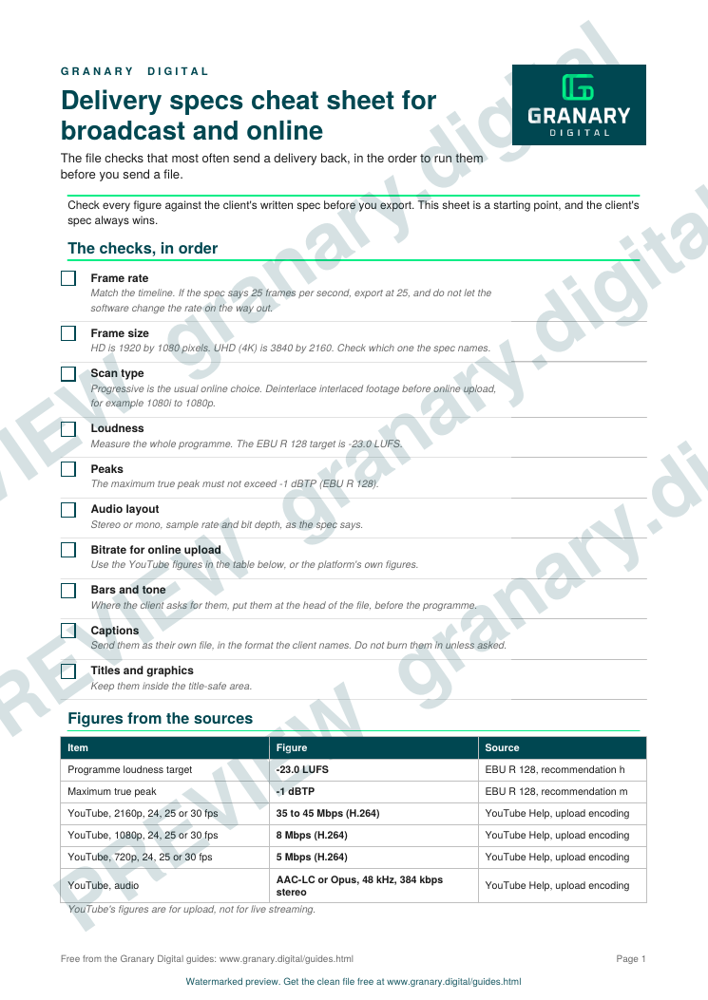
- Frame rate. Match the timeline. If the spec says 25 frames per second, export at 25, and do not let the software change the rate on the way out.
- Frame size. HD is 1920 by 1080 pixels. UHD 4K is 3840 by 2160. Check which one the spec names.
- Scan type. Progressive is the usual online choice. For upload, interlaced footage should be deinterlaced first, for example 1080i to 1080p.
- Loudness. Measure the whole programme. EBU R 128 (current version V5, November 2023) sets a target of -23.0 LUFS.
- Peaks. R 128 says the true peak level shall not exceed -1 dBTP.
- Audio layout. Stereo or mono, sample rate and bit depth as the spec says. For broadcast audio, 48 kHz is the usual sample rate, often at 24-bit, but the client's spec decides.
- Bitrate. For online upload, YouTube's recommended settings are 8 Mbps for 1080p, 5 Mbps for 720p, and 35 to 45 Mbps for 2160p, with 384 kbps stereo audio.
Get the checklist
The preview is free to look at and print. For the clean file, without the watermark, put your email in and we will send a download link straight away. You also join From the Barn, our monthly studio email, which you can leave whenever you like.
Open the watermarked preview (PDF)
Done. The download link is on its way to your inbox and works for 7 days. If it has not arrived in a few minutes, check your spam folder.
Test patterns, captions and titles
Where the client asks for bars and tone, put them at the head of the file, using the colour test patterns and the audio test pack. Captions and subtitles go in their own file, in the format the client names. The subtitles and captions guide covers the common formats. Titles and graphics should sit inside the title-safe area, and the lower thirds and title-safe guide sets out the margins.
Worked example
A UK broadcaster asks for a 25 frames per second HD programme, stereo, loudness at -23 LUFS, and bars and tone for 10 seconds at the head. The export is 1920 by 1080 at 25p. The programme measures -23 LUFS with the true peak at -2.1 dBTP. The file starts with bars and tone, and the captions go in a separate file. The sheet is ticked, and the file is sent with a checksum.
Common mistakes
- Trusting a cheat sheet over the client's spec. A sheet is a starting point. The spec from the client wins.
- Exporting at the wrong frame rate. A file shot at 24 frames per second and played at 25 runs about 4 per cent fast, so the picture speeds up and the sound rises in pitch unless it is corrected.
- Sending interlaced footage online. Deinterlace before upload.
- Measuring only the peaks. A file can have no peaks over the limit and still be far too loud on average.
- Burning captions into the picture when a separate file was asked for. Check which the client wants.
- Forgetting the final checks after an edit change. Re-run the loudness check after any change to the mix.
For broadcast files delivered in the UK, the broadcast delivery explained guide covers the file format most broadcasters ask for. The edit workflow explains where these checks sit in the order of work, and the dialogue loudness guide covers the measurement in more detail.
Sources
- EBU, R 128 Loudness normalisation and permitted maximum level of audio signals, read 5 November 2026
- EBU, R 128 Loudness normalisation and permitted maximum level of audio signals (V5, November 2023), read 5 November 2026
- YouTube Help, Recommended upload encoding settings, read 5 November 2026
Related guides
- Edit workflow: proxies, conform, delivery
- Colour test patterns and bars
- Lower thirds and title-safe templates
- Credits order worksheet (UK)
- Subtitles and captions: styles and file formats
- All guides and tools
The picture at the top of this page is an illustration, not a photograph of a client or a real job.
Questions we get asked
What frame rate should a video be delivered at?
Match the frame rate you shot and edited at, and check the client's spec. UK broadcast work is normally 25 frames per second. Drama and film work often use 24 or 23.976, and 29.97 mostly turns up in files made for US clients. Do not export at a different rate from the timeline without a reason.
What loudness should a broadcast file be?
EBU R 128 sets a target programme loudness of -23.0 LUFS, and says the true peak level of a programme shall not exceed -1 dBTP during production. Measure the whole programme, and check the broadcaster's sheet for any extra limit.
What bitrate should I use for YouTube?
YouTube's upload guide gives 8 Mbps for 1080p, 5 Mbps for 720p and 35 to 45 Mbps for 2160p (SDR, 24, 25 and 30 frames per second), with 384 kbps for stereo audio. Higher frame rates have higher figures, so check the page.
granary.digital · 01243 884993 · studio@granary.digital · The Old Grainstore, Adsdean, Chichester, West Sussex, PO18 9DN · Prices exclude VAT unless marked inc VAT