

In short: Measure the whole programme first, aiming for an average of -23 LUFS, which is the EBU R 128 target. Then check that the maximum true peak stays at or below -1 dBTP. Finally check the file's frame rate, sample rate and channels against the broadcaster's sheet. Peaks and loudness are separate measurements, and both need checking.
Loudness problems and peak problems look the same to a viewer, but they need different fixes. Measure the whole programme before anything else, then check the peaks, then check the file. A mix that comes back from a broadcaster has usually failed one of those three, and each check takes a few minutes.
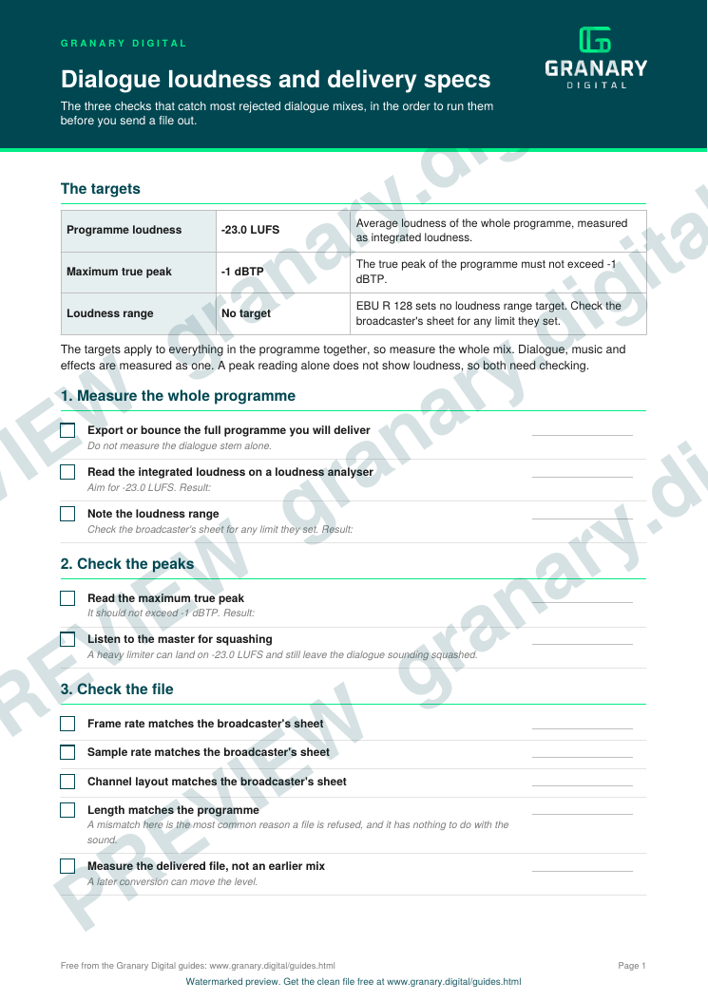
Get the checklist
The preview is free to look at and print. For the clean file, without the watermark, put your email in and we will send a download link straight away. You also join From the Barn, our monthly studio email, which you can leave whenever you like.
Open the watermarked preview (PDF)
Done. The download link is on its way to your inbox and works for 7 days. If it has not arrived in a few minutes, check your spam folder.
The targets
EBU R 128 is the European recommendation for programme loudness. It sets a target programme loudness of -23.0 LUFS, with a tolerance of ±1.0 LU where hitting the target is not practical, such as live programmes. It says the true peak level shall not exceed -1 dBTP. It says loudness range may be used to evaluate variation but gives no limit, so any loudness range limit comes from the broadcaster's own sheet. The current version is V5, November 2023. Measure the whole mix, because the target applies to everything in the programme together.
Steps
- Export the mix you will deliver, or bounce the full programme from the timeline. Do not measure the dialogue stem alone.
- Read the integrated loudness on a loudness analyser. Aim for -23 LUFS.
- Read the maximum true peak. It should not exceed -1 dBTP.
- Note the loudness range. Check the broadcaster's sheet for any limit they set.
- Check the file: frame rate, sample rate, channel layout and length. A mismatch here can get a file refused even when the sound is fine.
Worked example
A 12-minute interview film measures -18 LUFS integrated, and the true peak reaches -0.4 dBTP. The mix is 5 LU too loud. Bring the master down by 5 dB, and the peak falls to about -5.4 dBTP. Measure again after the change, and if a limiter sits on the master, check the peak after it as well as the loudness.
Common mistakes
- Setting a peak limit to the loudness target. Peak and average are different measurements, and the one number does not stand in for the other.
- Measuring the dialogue alone. Music and effects sitting above the dialogue can push the programme over target while the dialogue looks fine.
- Using a platform's target as the broadcast target. Platform specs and broadcast specs differ. Use the one your client has given you.
- Hitting the number with a limiter. A heavy limiter can land on -23 LUFS and still leave the dialogue sounding squashed. Listen before you send.
- Re-encoding after the check. Measure the file you deliver. A later conversion can move the level.
The delivery specs cheat sheet lists the wider file checks, and the test pack gives you a 1 kHz tone to check the chain before the mix. For the audio work itself, our sound and post-production page sets out what the mix includes. The sound report template is a useful place to record each measurement, with the date and the version of the mix.
Sources
- EBU, R 128 Loudness normalisation and permitted maximum level of audio signals, read 5 November 2026
- EBU, R 128 Loudness normalisation and permitted maximum level of audio signals (V5, November 2023), read 5 November 2026
Related guides
- Location sound starter: boom, lav, room tone
- Lav placement: where to clip a lavalier microphone
- Sound report template, with a worked example
- Timecode and sync explained, with an LTC test file
- Audio test pack: tones, pink noise and sweeps
- All guides and tools
The picture at the top of this page is an illustration, not a photograph of a client or a real job.
Questions we get asked
What loudness should a dialogue mix be delivered at?
For EBU R 128 the target is a programme loudness of -23.0 LUFS, and the true peak level should not exceed -1 dBTP. Dialogue, music and effects are measured together, because the target applies to what the viewer hears.
Is a peak reading enough to check loudness?
No. A peak reading shows the highest sample, while loudness measures the average over time. A mix can sit at the right peak and still be far too loud or quiet on average.
Do social platforms use the same loudness target?
Not necessarily. Each platform sets its own specification, so check its help pages and the spec your client gives you before you export.
granary.digital · 01243 884993 · studio@granary.digital · The Old Grainstore, Adsdean, Chichester, West Sussex, PO18 9DN · Prices exclude VAT unless marked inc VAT