

In short: List every item in order, from the welcome to the close, with a start time, a planned length and a buffer. Name each speaker as they want to be introduced, write the cue that starts and ends each item, and note the camera, slides and audio. Give one person responsibility for each item, share the sheet a week ahead, print it on the day, and change it in one place only.
A running order and cue sheet is the one document that everyone on a filmed event works from. It tells the MC when to speak, the camera operator which shot to take, the audio person which microphone to open and the stream operator what to show. Without it, the day depends on memory and the loudest voice.
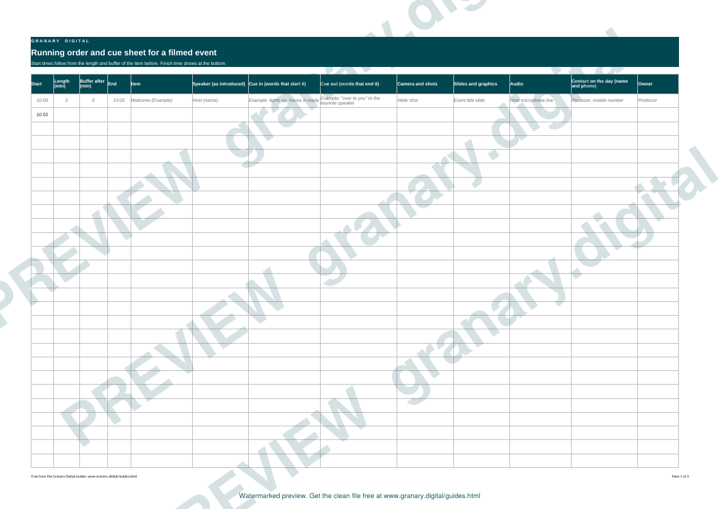
Get the template
The preview is free to look at and print. For the clean file, without the watermark, put your email in and we will send a download link straight away. You also join From the Barn, our monthly studio email, which you can leave whenever you like.
Open the watermarked preview (PDF)
Done. The download link is on its way to your inbox and works for 7 days. If it has not arrived in a few minutes, check your spam folder.
Who uses it
The organiser, the MC, the producer, the camera operators, the audio person, the stream operator and the venue's stage manager. Speakers should have the part that concerns them, so they know when they are on and what comes before and after.
How to fill it in, step by step
- List every item in order. Include the welcome, breaks, the Q&A, the panel and the close. An item that is not on the sheet will happen anyway, usually at the wrong time.
- Set a start time and a planned length for each item. Add a buffer at the end of each block, so one overrun does not move the whole afternoon.
- Name the speaker as they want to be introduced. Check the spelling and the job title with them, and note the pronunciation if it is unusual.
- Write the cue. Note the words that start the item and the words that end it. The MC and the producer both need them.
- Note the camera and graphics. Which shot, when the lower third appears, and when the slides change.
- Note the audio. Which microphones are live, whether music plays in or out, and any video that runs with sound.
- Name a contact for each item. One person, with a phone number, who can make a decision if the item changes.
- Share, print and lock. Send the sheet a week ahead, print copies for the people on the day, and make every change in the master copy only.
A worked example
A morning session with a welcome, a keynote and a panel.
| Time | Item | Speaker | Camera | Audio |
|---|---|---|---|---|
| 10:00 | Welcome, two minutes | Host | Wide shot | Host microphone live |
| 10:02 | Keynote, 25 minutes | Keynote speaker | Tight shot, slides on wide | Lectern feed; slides in from the laptop |
| 10:27 | Buffer, five minutes | None | Wide shot | Room microphone for questions |
| 10:32 | Panel, 30 minutes | Three panellists | Switch between speakers | Panel microphones; host microphone for the cue |
| 11:02 | Close, two minutes | Host | Wide shot | Host microphone live |
The cue for the keynote is the host saying the speaker's name and the words "over to you". The cue for the panel is the host asking the first question.
Common mistakes
- Times with no buffers, so a short overrun pushes the close past the end of the venue booking.
- No cue for the MC, who then starts too early or waits too long.
- A change to the times that the camera operator does not hear about.
- A speaker's name spelt wrongly in the introduction.
- "To be confirmed" on the day, when the answer could have been agreed a week before.
Keep the sheet in step with the rest of the production. Filming and streaming a conference: the organiser's checklist covers the decisions to make first. Our event AV production page explains how we run the production side of a filmed event, and do you need a vision mixer for your event stream explains when the cues need a person at the mixer.
Related guides
- Filming and streaming a conference: the organiser's checklist
- What you get from a filmed conference: a deliverables menu
- Speaker release and recording consent form
- All guides and tools
The picture at the top of this page is an illustration, not a photograph of a client or a real job.
Questions we get asked
What is a cue sheet for a filmed event?
A document that lists each item of the event with its start time, speaker, cue words, camera shot, slides and audio. Everyone who runs the recording or stream works from it.
How detailed should a running order be?
Detailed enough that someone who has never seen the event could run one item from it. That means times, names, cues and a contact for each item.
Who should own the running order?
One producer or organiser. Changes made in several places cause the most errors on the day, so every change goes through one person.
granary.digital · 01243 884993 · studio@granary.digital · The Old Grainstore, Adsdean, Chichester, West Sussex, PO18 9DN · Prices exclude VAT unless marked inc VAT