

In short: A speaker release records that a speaker agreed to be filmed, says where the recording will appear and for how long, and gives the speaker a named route to ask for changes. Send it with the speaker confirmation, have it signed before the event, and keep the signed copies with the event file. The template is a starting point, not legal advice.
A speaker release records that a speaker agreed to be filmed, where the recording will go and how they can ask for changes. Send it early, and keep the signed copies with the event file.
What the form is for
A speaker release does three jobs. It records that the speaker agreed to be filmed. It says where the recording will appear and for how long. It gives the speaker a named person to contact about changes or removal. The organiser, the speaker and the filming team each need to understand what it covers.
Get the template
The preview is free to look at and print. For the clean file, without the watermark, put your email in and we will send a download link straight away. You also join From the Barn, our monthly studio email, which you can leave whenever you like.
Open the watermarked preview (PDF)
Done. The download link is on its way to your inbox and works for 7 days. If it has not arrived in a few minutes, check your spam folder.
Who uses it, and when
- The organiser sends the form with the speaker confirmation, well before the event.
- The speaker reads it, asks questions if needed, and returns it signed.
- The filming team checks the list of signed releases before the first session.
- The organiser keeps the signed copies with the event file, and notes who signed and when.
How to fill it in, step by step
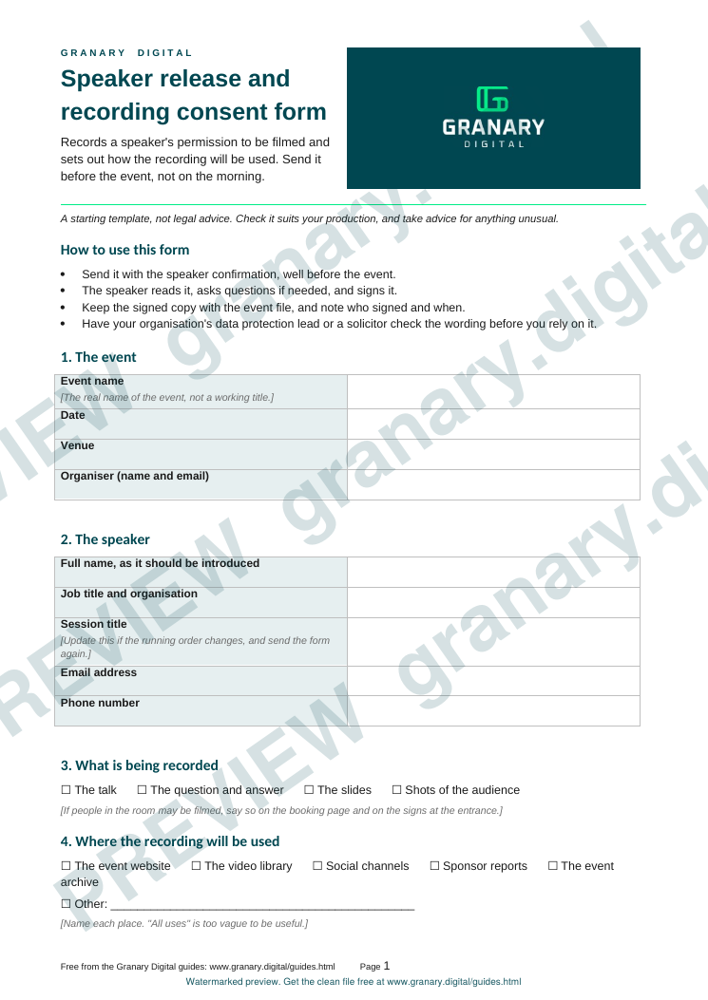
- Name the event, the date, the venue and the organiser. Use the event's real name, not a working title.
- Name the speaker and the session title. If the running order changes, update the session title on the form and resend it.
- Describe what is being recorded. Say whether it covers the talk, the question and answer, the slides and any shots of the audience.
- List where the recording will be used. Name the event website, the video library, social channels, sponsor reports or the archive. "All uses" is too vague to be useful.
- Say how long the recording stays online or on file. Give a period, or say when it will be reviewed.
- Explain how the speaker can ask for changes or removal. Give a named contact, an email address and a time frame for the response.
- Ask about the speaker's own material. Speakers should confirm they have the right to use any images, music or footage in their slides.
- Add a signature block. Printed name, signature and date. If the speaker is under 18, add a line for a parent or guardian.
A worked example
This example is invented for illustration.
- Event: Example Forum, 14 March 2027, the Old Barn Hall
- Speaker: Sam Example, session "Writing for the ear"
- Recording covers: the talk and the question and answer, with slides
- Used on: the event website and the video library, with social clips from the talk
- Kept for: three years, then reviewed
- Changes: email events@example.org by 1 April 2027
Sam reads the form, asks whether the slides can be shown in full, and signs it two weeks before the event. The organiser files it with the running order.
Common mistakes
- Sending the form on the day of the talk.
- Writing "any use" in place of a list of places.
- Leaving out a route for changes, or giving a route nobody reads.
- Failing to record who signed and when.
- Forgetting the audience. If people in the room may be filmed, say so on the booking page and on the signs at the entrance.
Before you use it
This template is a starting point and not legal advice. Have your organisation's data protection lead, or a solicitor, check the wording before you rely on it. For when filming people needs consent in the first place, read filming people, consent and the UK GDPR. The Information Commissioner's Office says its consent guidance is under review, so check the current version before you rely on it. The location release covers the same ground for places rather than people.
Sources
- Information Commissioner's Office, Consent guidance under the UK GDPR, read 5 November 2026
Related guides
- Filming and streaming a conference: the organiser's checklist
- What you get from a filmed conference: a deliverables menu
- Running order and cue sheet for a filmed event
- All guides and tools
The picture at the top of this page is an illustration, not a photograph of a client or a real job.
Questions we get asked
What is a speaker release form for?
It records that a speaker agreed to be filmed and says where the recording will be used. It also gives the speaker a named contact to ask for changes or removal, so nobody is left guessing after the event.
When should a speaker sign a release?
Before the event, as part of the speaker confirmation. Signing on the morning leaves no time to check the wording, and it puts pressure on the speaker to agree to terms they have not read properly.
Does a speaker release replace legal advice?
No. Use the template as a starting point, and have your organisation's data protection lead or a solicitor check the wording before you rely on it.
granary.digital · 01243 884993 · studio@granary.digital · The Old Grainstore, Adsdean, Chichester, West Sussex, PO18 9DN · Prices exclude VAT unless marked inc VAT