

In short: Decide the outputs first: full sessions, a live stream, short clips or a recap. Ask every speaker to agree to being filmed and to how the recording will be used, in writing. Get an audio feed from the stage rather than relying on room microphones. Test the stream at least an hour before going live, keep a backup, and give one person ownership of the running order.
Filming and streaming a conference goes wrong most often in the planning, not on the day. The recording gets shot from the back of the room, a speaker has not agreed to be filmed, or the stream is never tested end to end. This checklist sets out the decisions to make early and the people to tell, so the day is run from a plan.
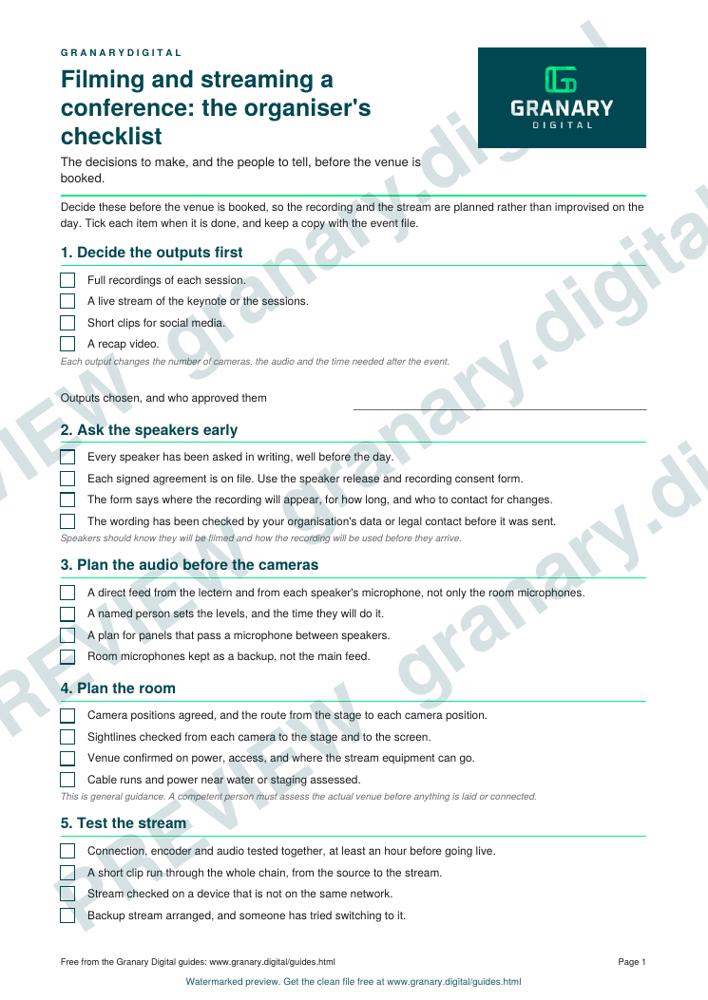
Get the checklist
The preview is free to look at and print. For the clean file, without the watermark, put your email in and we will send a download link straight away. You also join From the Barn, our monthly studio email, which you can leave whenever you like.
Open the watermarked preview (PDF)
Done. The download link is on its way to your inbox and works for 7 days. If it has not arrived in a few minutes, check your spam folder.
Decide the outputs first
Before you book a camera, decide what you want to come out of the day. Full recordings of each session, a live stream of the keynote, a set of short clips for social media and a recap video are different jobs. Each one changes the number of cameras, the audio and the time needed after the event. The deliverables menu for a filmed conference sets out the usual options.
Ask the speakers early
Speakers need to know they will be filmed, how the recording will be used and whether it will go online. Ask each one in writing, well before the day, and keep the agreement on file. A speaker release and recording consent form gives you a starting point. If you are unsure what the wording should say about use or retention, check with your organisation's data or legal contact before you send it.
Plan the audio before the cameras
Good sound makes a recording usable, and a good picture cannot save poor sound. Ask the venue for a direct feed from the lectern or from each speaker's microphone, rather than relying on the room microphones. Confirm who will set the levels, and when. Agree a plan for panel discussions, where speakers pass a microphone between them.
Plan the room
Agree where the cameras will sit and the route from the stage to the recording position. Check the sightlines from each camera to the stage and the screen. Ask the venue about power, access and where the stream equipment can go. Cable runs across a floor, and power near water or staging, are safety matters. This is general guidance, and a competent person must assess the actual venue before anything is laid or connected.
Test the stream
Test the connection, the encoder and the audio together, at least an hour before going live. Run a short clip through the whole chain, and check the stream on a device that is not on the same network. Hold a backup. Granary's event streaming toolkit, described on the event AV production page, runs a main and a backup stream, with automatic failover if the main stream drops. Keep the backup plan simple enough that someone can switch to it without thinking.
Name the people
- A producer who owns the running order and makes the final calls on the day.
- A stream operator who watches the output and the connection.
- An audio person who owns the levels and the microphones.
- A camera operator for each shot.
- A speaker liaison who meets each speaker and checks their name and their slides.
A worked example
A half-day conference with four speakers and a panel. The organiser wants full recordings of each session, a live stream of the keynote and two short clips for social media. Speaker agreements are in hand four weeks before, the venue confirms the audio feed two weeks before, and the running order is fixed a week ahead. On the day, the stream is tested an hour before the keynote. The producer owns the running order, and the speaker liaison meets each speaker at the side of the stage.
Common mistakes
- Filming a speaker who has not agreed to it.
- Relying on room microphones, then finding the panel is inaudible on the recording.
- Testing the stream only on the morning of the event, without the real connection.
- No backup stream, or a backup nobody has tried.
- No single owner for the running order, so changes are made in three places.
The running order and cue sheet template is the document that ties the day together. If you want a hybrid event with people in the room and people watching online, hybrid events: presenting to a room and a camera covers the presenter side, and live streaming an event: the five things that go wrong lists the usual failures.
Related guides
- What you get from a filmed conference: a deliverables menu
- Speaker release and recording consent form
- Running order and cue sheet for a filmed event
- All guides and tools
The picture at the top of this page is an illustration, not a photograph of a client or a real job.
Questions we get asked
What do I need to film and stream a conference?
A clear list of outputs, written agreement from each speaker, an audio feed from the stage, a tested stream with a backup, a run of show with timings, and one named person to run the day.
Do speakers have to agree to be filmed at a conference?
Ask every speaker in writing before the day. Use a release form that says how the recording will be used. If you are unsure what the form should say, check with your organisation's data or legal contact before you send it.
How far ahead should a conference stream be tested?
At least an hour before going live, with the connection, the encoder and the audio all checked together.
granary.digital · 01243 884993 · studio@granary.digital · The Old Grainstore, Adsdean, Chichester, West Sussex, PO18 9DN · Prices exclude VAT unless marked inc VAT